

Frontend modernization can be a game-changer for enterprises, but 79% of these projects fail, often costing organizations millions. Why? Misaligned priorities, poor planning, and technical debt are the usual suspects. Here’s what you need to know:
- Modernization Goals: Upgrade outdated frameworks (like AngularJS or jQuery) and break down monolithic frontends into microfrontends for better scalability and performance.
- Key Challenges:
- Misaligned Teams: Engineering focuses on backend efficiency, while product teams prioritize user experience.
- Big Bang Approach: Attempting large-scale replacements instead of phased rollouts increases risks.
- Technical Debt: Outdated systems with hidden dependencies and hard-coded logic slow progress.
- Legacy System Integration: Fragile connections and undocumented processes create unexpected hurdles.
- Why It Matters: Sticking to legacy systems introduces security risks, complicates compliance, and hinders performance.
- Solutions:
- Use phased strategies like the Strangler Fig Pattern for gradual migration.
- Align teams on shared goals and success metrics.
- Transition to modular architectures (microfrontends) for independent updates.
- Invest in training and AI tools to address team skill gaps.
Modernization isn’t just about technology; it’s about aligning people, processes, and tools to reduce risks and deliver results.
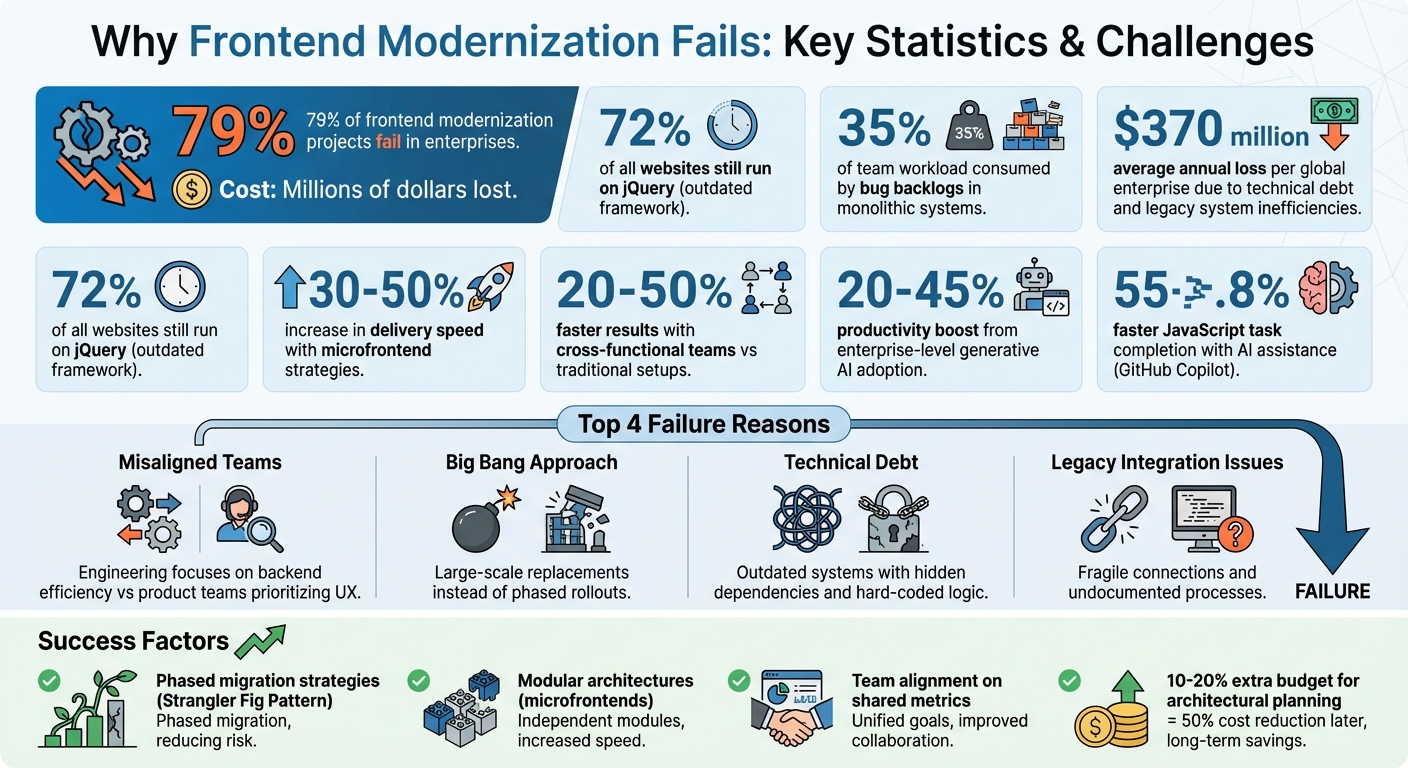
Frontend Modernization Failure Statistics and Key Challenges in Enterprise Projects
Common Problems in Frontend Modernization
When Stakeholders Don’t Agree on Goals
Engineering and product teams often have different priorities, which can lead to serious challenges during frontend modernization. Engineers tend to focus on technical aspects – like creating scalable backends, achieving full test automation, or adopting "future-proof" technologies. On the other hand, product teams usually emphasize user-facing improvements, such as real-time data updates or smoother workflows. When these priorities clash, integration issues are almost inevitable [1][10].
Business stakeholders sometimes fall into the "feature parity" trap, insisting that the new system replicate the old one exactly to minimize perceived risks. This mindset blocks opportunities for meaningful improvements and often pushes teams toward risky, all-at-once "big bang" releases instead of delivering incremental value [9]. The disconnect grows when technical teams measure success by outputs – like the number of screens built – rather than real business outcomes, such as user adoption or increased revenue [10].
"Legacy modernization rarely fails because a team ‘picked the wrong framework.’ It fails because the system is a museum of real business decisions: edge-case rules no one remembers, integrations that only break at 2 a.m., and data that behaves differently depending on which report is asking." – Roman Oshyyko, Design Director, CodeGeeks Solutions [11]
When developers focus too much on the technical side, they often lack the business insight needed to decide which legacy features should be improved or eliminated. As a result, they end up replicating outdated business logic simply because it exists in the old codebase [10][5]. Unrealistic project timelines make things worse. These deadlines are often set without a deep understanding of the legacy system, leading to delays and broken trust between IT and business leaders [1].
Next, let’s look at how technical debt and outdated systems compound these issues.
Technical Debt and Outdated Systems
Technical debt is a major obstacle in modernization, with outdated frameworks being a key contributor. Take jQuery, for example – it still runs on about 72% of all websites, showing how deeply rooted these older technologies are [3]. These frameworks not only slow progress but also introduce security vulnerabilities and compliance risks.
Monolithic frontends add another layer of complexity. When systems are tightly coupled, even minor updates require extensive regression testing, and bug backlogs can consume up to 35% of a team’s workload [5]. Additionally, legacy business rules – often hard-coded into outdated systems or shaped by old "green screen" terminal constraints – force modern workflows to adapt to antiquated technical limitations [9].
A case study from February 2024 highlights how modernization can succeed with the right approach. VMware Tanzu worked with a global shipping company in Southeast Asia, running an "Event Storming" workshop with six developers and two business owners. In just five days, they identified 12 high-value business processes and 10 potential microservices, avoiding unnecessary duplication of legacy code [5].
Another example comes from a major airline’s check-in system. The system’s legacy "green screen" terminals couldn’t handle connecting flights – a feature added after the system’s creation. Staff had to follow a rigid, non-linear process, which often resulted in errors like printing incorrect baggage tags if passengers didn’t mention connecting flights upfront. In this case, the outdated technology dictated how employees worked [9].
Now, let’s explore how legacy system integrations create additional hurdles.
Problems Connecting to Legacy Systems
Modernizing frontend systems often reveals hidden dependencies buried in old code or stored in the memories of long-time employees. These undocumented connections only come to light during system changes, creating unexpected challenges [11]. Legacy systems depend on batch jobs, shared database tables, and internal scripts that were never designed for modern workflows.
Older systems were built for internal use, not for today’s API-driven ecosystems. This results in fragile, point-to-point integrations – essentially a "spiderweb" of connections prone to breaking in unpredictable ways. Legacy databases also encode logic using "magic values" or status flags, which can create chaos when migrated to modern systems without addressing data inconsistencies. This often leads to broken reports and failed workflows.
Governance processes tied to legacy systems further slow modernization efforts. Middle management frequently applies outdated change control rules to new projects, forcing teams to spend more time on bureaucratic tasks than on actual development [9]. The financial impact is staggering: the average global enterprise loses over $370 million annually due to technical debt and inefficiencies tied to legacy systems [11].
The Problems Micro Frontends Won’t Solve That No One Wants to Talk About – Jennifer Wadella
How to Modernize Successfully
Tackling alignment issues and technical debt is just the starting point. To modernize effectively, you need strategies that balance progress with manageable risks. Here’s how to approach it.
Rolling Out Changes in Phases
The safest way to modernize is through incremental migration rather than attempting a full system rewrite. A method like The Strangler Fig Pattern allows you to introduce new features gradually, enabling them to replace the legacy system over time. This approach minimizes the risk of a catastrophic "big bang" failure [13]. For example, you can start with a reverse proxy that redirects requests to the legacy system, ensuring a smooth transition while new components are integrated [14].
There are two main ways to approach this:
- Page-by-page migration: Rebuild and launch entire pages in batches.
- Component-by-component migration: Update individual parts when clear boundaries exist [13].
You can also choose between vertical increments (migrating functional subsets feature-by-feature) or horizontal increments (phasing in user groups gradually) [14].
Companies that adopt microfrontend strategies focused on improving customer experience have reported delivery speeds increasing by 30% to 50%, all while using the same resources [7]. Start with low-risk, high-impact pages to build momentum and confidence before tackling more complex systems [13]. To ensure compatibility, use dark launches – sending traffic to both the old and new systems simultaneously – to identify and resolve issues before fully transitioning users [14].
"The most reliable path from legacy to modern architecture is incremental migration rather than a complete rewrite." – Mark Knichel, Vercel [13]
Once your migration is underway, fostering collaboration among your teams becomes just as crucial.
Getting Teams to Work Together
Before diving into solutions, it’s vital for product, engineering, and design teams to align on a shared problem statement. Revisiting this statement regularly can help avoid missteps, like solving different versions of the same issue. Teams should also define success metrics that go beyond deadlines – such as user adoption rates or feedback scores. This ensures the focus remains on meaningful outcomes, not just deliverables.
Involve developers who understand the legacy system’s business rules and quirks to prevent unexpected challenges during the MVP launch [15]. Transition from manual review boards to automated governance tools, which enforce rules like dependency limits and interface contracts [6]. Cross-functional teams that own a product area from start to finish often achieve results 20% to 50% faster than traditional development setups [7].
With aligned teams in place, a structured framework like AlterSquare’s I.D.E.A.L. Framework can guide the modernization process.
Using AlterSquare‘s I.D.E.A.L. Framework
AlterSquare’s I.D.E.A.L. Framework breaks modernization into five clear phases, starting with Discovery. This phase focuses on identifying misalignments and bringing stakeholders together. AI-driven tools map out legacy repositories, dependencies, and hidden business logic in outdated code [3]. This step not only clarifies the scope but also helps secure budget approval and shared understanding before any development begins.
The Design phase creates the architectural roadmap and UI/UX plan, identifying "seams" to break large systems into modular components [16]. Development then builds these modules using modern tools like monorepos for shared code and feature flags to toggle between old and new experiences [13].
During Launch, phased rollouts use traffic-shifting and monitoring tools to catch regressions early [13]. Finally, Post-Launch Support ensures ongoing maintenance and scalability. This phase moves through validation steps like "Proof of Problem" (internal alignment), "Proof of Value" (prototyping), and "Proof of Impact" (testing market viability) before scaling up [12].
This phased approach ensures modernization doesn’t have to be an all-or-nothing gamble. By breaking it into manageable steps, teams can move forward with confidence [12].
sbb-itb-51b9a02
Technical Approaches That Work
Once stakeholders are aligned and a strategy is chosen, the next step is to dive into the technical methods that ensure systems remain scalable and easy to maintain.
Building with Modular Architecture
Breaking a monolithic frontend into microfrontends allows teams to deploy features independently. Each module operates with its own CI/CD pipeline, meaning one team can roll out updates while others continue their work without interference [17][18]. This setup helps large organizations avoid bottlenecks caused by excessive coordination.
By decoupling codebases, failures are contained within specific modules, preventing a single bug from taking down the entire application [20]. For instance, even if the checkout module encounters an issue, the product catalog can keep running smoothly.
"The core problem microfrontends address is team autonomy – allowing feature teams to ship value independently, on their own cadence, without waiting for a central ‘frontend release train.’" – Sudhir Mangla, Frontend Architect [20]
Here’s a comparison of monolithic and modular architectures:
| Feature | Monolithic Frontend | Modular (Microfrontends) |
|---|---|---|
| Deployment | Single, coordinated release | Independent, per-module releases [17][21] |
| Team Structure | Functional silos (Frontend/Backend) | Cross-functional, domain-aligned teams [6] |
| Tech Stack | Single framework (locked-in) | Technology diversity (polyglot) possible [19][21] |
| Build Times | Increases with app size | Fast, isolated builds for each module [21][6] |
| Failure Impact | Single error can crash the whole app | Failures are localized to specific modules [20][6] |
To succeed with this approach, define clear contracts between modules early on. Use typed APIs or event-driven communication instead of relying on shared global state. This minimizes state leaks and ensures modules remain independent [20]. Start with a low-risk module to test your integration strategy before scaling up [18]. Tools like Module Federation (available in Webpack 5, Rspack, or Vite) are invaluable for dynamically loading code at runtime, eliminating the need for synchronized releases across teams [18][20].
Once a modular structure is in place, the focus can shift to improving application speed.
Making Applications Faster
Performance is a key factor during modernization, especially when users compare the new system to the old one. Techniques like lazy loading – fetching modules only when they’re needed – help reduce initial load times. Combine this with code splitting to break large bundles into smaller, on-demand chunks [20][21].
For shared libraries like React or Angular, configure them as singletons in Module Federation. This ensures the framework loads only once across all modules, preventing unnecessary duplication and keeping the app responsive [20][22].
Design the host application to handle failures gracefully. For example, if a module crashes, display a fallback message like "Feature temporarily unavailable" to maintain functionality [20][22].
Fixing Team Skill Gaps
Modernizing systems is about more than just architecture – it also requires modernizing the team. A lack of experience with new frameworks or patterns can slow progress. The quickest way to address this is through hands-on training tailored to the tools you’re adopting, such as React, Vue, or microfrontend principles [4][23]. Workshops and mentorship programs are especially effective because they tackle real-world challenges your team will face.
Instead of hiring externally, consider cross-training your current staff. Developers familiar with your business logic and legacy systems can adapt more quickly to new technologies [4]. For specialized tasks – like implementing Module Federation or designing a Backend-for-Frontend (BFF) layer – partnering with external experts can help speed things up [23].
AI tools can also help bridge skill gaps. For example, developers using AI assistance like GitHub Copilot complete JavaScript tasks 55.8% faster, and enterprise-level adoption of generative AI can drive a 20% to 45% productivity boost [3]. These tools handle tasks like code analysis, test creation, and documentation, freeing developers to focus on high-level decisions.
Lastly, create a Center of Excellence to manage shared standards and reusable components. This team provides guidelines, design systems, and interface contracts while allowing domain teams to maintain control over their modules [6]. Striking this balance ensures progress without descending into chaos.
Conclusion
Key Takeaways
Frontend modernization often stumbles when teams overlook the basics – like aligning stakeholders, setting shared success metrics, and planning phased implementations. Before diving into code, align everyone on clear goals. Use the Strangler Fig approach to replace outdated systems step by step, delivering incremental wins along the way [1][8]. Transitioning from monolithic to modular architectures is also critical, as it allows teams to work independently and avoid coordination bottlenecks [2][6]. Remember, modernization isn’t just about technology; it also requires shifts in team dynamics and workflows [1][6].
Involve legacy team members early in the process – they hold invaluable knowledge that may not be documented anywhere else [1]. During transitions, running parallel systems with feature flags can help roll out changes gradually and minimize risks [16][25]. To avoid costly rebuilds later, allocate an extra 10–20% of your budget upfront for thorough architectural planning, which could reduce future costs by up to 50% [24].
This roadmap provides a solid foundation for AlterSquare’s tailored modernization solutions.
How AlterSquare Supports Your Journey
AlterSquare’s I.D.E.A.L. framework addresses the most common pitfalls in modernization projects. It follows a five-phase process: Discovery & Strategy, Design & Validation, Agile Development, Launch Preparation, and Post-launch Support [24][25]. Each phase is designed to guide you systematically, ensuring smooth progress from planning to ongoing improvements. Plus, their Zero Technical Debt Guarantee ensures scalable, future-proof code from day one [24].
With expertise in modular architectures and modular monoliths, AlterSquare helps teams scale specific components independently, based on actual demand [24]. Their AI-powered tools accelerate the process, offering automated code generation, predictive analytics, and rapid prototyping to test scalability early on [24]. For teams lacking specific expertise, AlterSquare’s Engineering-as-a-Service fills the gap with specialists in modern stacks like Vue.js, Nuxt.js, GoLang, and Node.js [24][25].
These solutions equip you to tackle modernization with confidence and efficiency.
Next Steps to Take
Start by mapping out your legacy systems. Document their dependencies, technical debt, and any embedded business logic [1][3]. Collaborate with stakeholders to define clear goals – whether it’s reducing change costs, streamlining processes, or retiring unsupported systems [9]. Select a migration strategy that fits your needs: the Strangler Fig approach for gradual replacement, Outside-In for shell migration, or Inside-Out for component replacement [8][26].
Consider running a 3–4 week proof of concept to validate your architecture and gain stakeholder support without overcommitting resources [8]. Use feature flags to manage newly migrated components, allowing for controlled rollouts and quick reversals if needed [26]. Focus your efforts on improving Core Web Vitals like Interaction to Next Paint (INP) and Largest Contentful Paint (LCP), as these directly impact SEO and user retention [3].
With AlterSquare’s structured approach, you can modernize safely and effectively. Explore their tailored solutions to match your unique goals, timeline, and budget.
FAQs
Why do enterprise frontend modernization projects often fail?
Enterprise frontend modernization efforts often stumble due to misaligned expectations among stakeholders, lingering technical debt, and difficulties in working with legacy systems. These hurdles can result in poorly thought-out plans, missed deadlines, and solutions that don’t align with business goals or user requirements.
On top of that, dismantling monolithic systems into smaller, more manageable pieces is no easy task. It demands a well-thought-out strategy and precise execution. Without a phased approach and strong teamwork across departments, these projects can spiral out of control and lose their direction.
To boost the chances of success, it’s essential to define clear objectives, engage all stakeholders from the start, and use tools and techniques that ensure smooth integration and scalability.
How can enterprises ensure team alignment for successful frontend modernization?
For frontend modernization to succeed, enterprises need to align their teams by setting clear goals and encouraging collaboration across departments. This involves breaking down barriers between development, product, and operations teams to foster seamless cooperation. When everyone shares responsibility and communicates effectively, it reduces the risk of misaligned expectations and ensures that all efforts are directed toward common objectives.
Taking an incremental approach – like gradually replacing outdated systems while continuously delivering value – can help reduce risks and avoid major disruptions. Leveraging tools for automation, dependency mapping, and regular feedback loops can also keep the process on track. By prioritizing strategic alignment and phased execution, businesses can enjoy smoother transitions, enhanced developer workflows, and better experiences for their users.
How can technical debt be effectively managed during frontend modernization?
Effectively managing technical debt during frontend modernization is key to ensuring a smooth transition and setting the stage for long-term success. One effective method is using incremental modernization strategies, like breaking down monolithic systems into smaller, independently deployable components. This gradual approach helps teams tackle technical debt step by step, reducing disruptions to daily operations. Techniques such as the Strangler Fig pattern are particularly useful, as they allow legacy systems to be replaced piece by piece instead of requiring a complete system overhaul.
It’s also important to set clear goals and priorities for addressing technical debt. When these efforts align with business objectives, the modernization process is more likely to deliver measurable value. Regular performance checks and feedback loops play a crucial role in spotting and resolving issues early, preventing them from becoming larger problems. Finally, encouraging a mindset where technical debt is treated as an ongoing responsibility – and embedding its management into everyday development practices – helps teams build frontend systems that are both scalable and easier to maintain over time.








Leave a Reply