

Reaching $1M in ARR is a huge milestone for SaaS companies, but it often reveals cracks in your codebase that can hinder future growth. Early shortcuts – like quick fixes or hardcoding – become bottlenecks, slowing development and creating scalability issues. At this stage, refactoring isn’t optional; it’s necessary to maintain stability, improve performance, and support growth.
Key points:
- Why $1M ARR matters: Your systems now handle more traffic, users, and data than they were built for.
- Common issues: Slow database queries, server crashes, and fragile architectures that break under pressure.
- How to identify tech debt: Look for slower development cycles, high change failure rates, and rising maintenance costs.
- Solutions: Prioritize fixes using a Traffic Light Roadmap (Critical, Managed, Scale-Ready tasks) and focus on incremental upgrades to avoid breaking production.
Refactoring isn’t just about cleaning up code – it’s about aligning your systems with your business growth. Fixing these issues early can save 15–25% in future costs and prevent scaling problems that could derail your momentum.
7 Ways to Get Ahead of Technical Debt & Keep It Under Control
sbb-itb-51b9a02
Why $1M ARR Triggers Architectural Changes
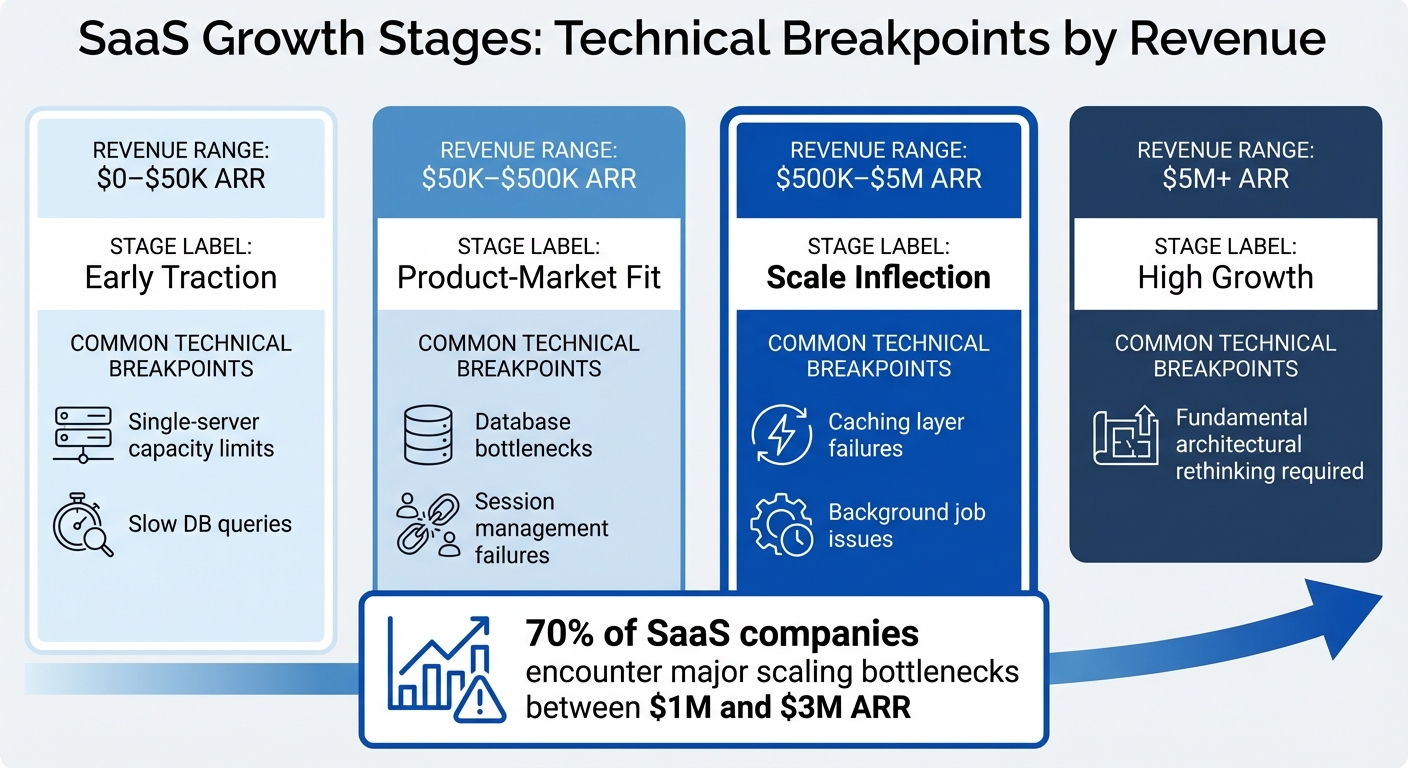
SaaS Growth Stages and Technical Breakpoints from $0 to $5M ARR
Hitting $1M ARR is a turning point for SaaS companies. By this stage, your system is handling far more traffic, users, and data than it was ever designed to manage. What used to be a quick 50-millisecond database query might now stretch to 5 seconds, and that trusty single server you relied on in the beginning? It’s likely crashing under the strain. These aren’t minor hiccups – they’re clear signs that your system’s architecture needs to grow alongside your business. In fact, 70% of SaaS companies encounter major scaling bottlenecks between $1M and $3M ARR [10]. This is no coincidence; it’s the natural outcome of prioritizing speed over long-term scalability in the early days.
The systems that helped you move fast during the startup phase weren’t built to handle the complexities of a growing business. With more customers come more integrations, edge cases, and simultaneous workflows. Add a larger development team into the mix, and every new feature becomes a potential risk to the codebase.
From Speed-First to Scale-First Architecture
Scaling up requires a shift in mindset – a move from speed-first to scale-first architecture. Early on, startups often focus on speed: hardcoding business rules, skipping documentation, and using “God objects” that handle too many responsibilities. While this approach works when testing product-market fit, it quickly becomes a liability as your user base grows.
One of the first changes in a scale-first architecture is moving from synchronous to asynchronous processing. For example, if generating a report takes 3 seconds, keeping the server thread tied up during that time can overwhelm server capacity as more users join. To avoid this, scale-first systems use background job queues like Sidekiq or Celery to offload tasks that take more than 500 milliseconds, keeping applications responsive [8].
Another key adjustment is session storage. As you scale horizontally across multiple servers, storing sessions in application memory leads to problems – users may get logged out when their requests hit different servers. Moving session storage to Redis solves this issue, ensuring a seamless user experience [8].
"The phrase ‘we’ll refactor later’ operates on the assumption that later costs about the same as now. It doesn’t." – Igor Maric [12]
Delaying these architectural upgrades can be costly. Mismanagement and scaling issues contribute to the downfall of 35% of startups [2]. The longer you wait to address these challenges, the more expensive and risky the fixes become.
Common Technical Bottlenecks at $1M ARR
As your system transitions to scale-first principles, certain technical bottlenecks are almost guaranteed to appear. For example, database connection limits can cripple performance. Most Postgres installations default to 100 connections, and without connection pooling tools like PgBouncer, your system may hit a wall [8].
Another common issue is the N+1 query problem. Loading related data in loops might work fine for a small dataset but can lead to timeouts when dealing with tens of thousands of records. A page that used to load in 50 milliseconds could suddenly take 5 seconds, driving users away [8].
Single-tenant architectures also become a headache at this stage. Managing 100 separate databases might have been fine early on, but it turns every schema update into a manual nightmare, slowing down feature releases [8].
| Growth Stage | Revenue Range | Common Technical Breakpoints |
|---|---|---|
| Early Traction | $0–$50K ARR | Single-server capacity limits, slow DB queries |
| Product-Market Fit | $50K–$500K ARR | Database bottlenecks, session management failures |
| Scale Inflection | $500K–$5M ARR | Caching layer failures, background job issues |
| High Growth | $5M+ ARR | Fundamental architectural rethinking required |
How to Assess When Your Codebase Needs Refactoring
Determining the right time to refactor your codebase often comes down to identifying measurable signs that link technical challenges to business outcomes. While vague complaints like "the code is messy" or "everything feels slow" might surface, the real need for refactoring becomes clear through specific metrics and patterns.
Warning Signs of Growing Tech Debt
One of the most obvious red flags is a drop in development speed. If tasks that once took two days now take two weeks, it’s a clear sign that technical debt is slowing progress. On average, technical debt eats up about 42% of a developer’s time, translating to roughly $42,000 per developer per year in lost productivity [7].
Pay attention to how much time your team spends maintaining existing systems versus building new features. If only 30–40% of their time goes toward new development while the rest is spent debugging or patching broken systems, your codebase is likely overloaded. Research shows that organizations allocate 70–80% of their IT budgets to maintaining current systems rather than innovating [3][7].
Another indicator is the "fear factor." When experienced engineers avoid certain parts of the code because updating them causes unexpected bugs elsewhere, it points to a fragile architecture. Studies reveal that about 20% of files in a typical codebase are responsible for 80% of software defects [7]. Using tools like git log analysis can help pinpoint these "hotspots" – files with frequent changes and high bug-fix activity – which should be prioritized for refactoring [14].
Additionally, monitor your Change Failure Rate, which measures the percentage of production deployments that lead to incidents or require urgent fixes. If more than 20–30% of changes to specific modules result in production issues, you’re likely overspending on emergency fixes and support [13]. Persistent instability can also drive customer churn rates up by 20–30% [1].
| Metric | Indicator of Debt | Action Threshold |
|---|---|---|
| Delivery Impact | Over 50% overage on estimates | Prioritize fixes in the next quarter [13] |
| Change Failure Rate | Over 30% of changes cause incidents | Immediate action needed; high revenue risk [13] |
| Technical Debt Ratio | Over 40% of system value | Critical; system nearing its limit [7] |
| CI Pipeline Time | Over 10% monthly growth | Investigate bottlenecks in the build system [13] |
When these metrics reveal underlying issues, the next step is to connect refactoring efforts to business goals.
Aligning Refactoring with Business Goals
Once technical debt is identified, it’s crucial to frame the problem in terms that resonate with business stakeholders. Refactoring should be positioned as a way to remove barriers to growth, emphasizing lost engineering hours, delayed customer commitments, and the cost of addressing incidents [13][14].
For example, calculate your Delivery Impact Score by measuring how much development time overruns initial estimates. If overruns consistently range between 50–100%, it highlights a significant business problem [13]. Heavy technical debt can also slash feature delivery capacity by 25–50% [11].
The Technical Debt Ratio (TDR) offers another perspective, comparing the cost of fixing debt to the overall system cost. A TDR below 5% is manageable, but anything above 40% signals a system under severe strain, with technical debt potentially accounting for up to 40% of a company’s IT budget [7][11].
To maximize the impact of refactoring, focus on modules that directly affect customer experience, revenue-generating features, or frequently cause production issues. Addressing scalability problems after a product gains traction can cost 2–3 times more than addressing them during initial development [1]. Delaying fixes only inflates costs.
"Technical debt isn’t ‘bad code.’ It’s the delta between the current state of your system and the state it needs to be in to support your current and near-future business goals." – Ward Cunningham [13]
A practical approach to managing technical debt is the 20% Rule: reserve 20% of every sprint’s capacity for addressing debt [14]. This allows for consistent progress without stalling feature development. Companies that actively manage technical debt can cut their overall tech spending by 25–50% without reducing team size [7].
The Traffic Light Roadmap: How to Prioritize Refactoring Work
The Traffic Light Roadmap is a practical way to organize refactoring work by focusing on two key factors: business impact and technical risk. Instead of treating all tech debt equally, this method groups tasks into three categories: Critical (Red), Managed (Yellow), and Scale-Ready (Green).
This approach scores each issue based on how it affects business outcomes (such as delivery speed, revenue, or user experience) and how challenging or risky it is to fix. High-impact, low-risk tasks are quick wins, often completed in just a few hours per sprint. On the other hand, high-impact but high-risk tasks require careful planning and dedicated resources [15]. By categorizing tasks this way, teams can address immediate needs, plan incremental improvements, and tackle long-term challenges strategically.
"Technical debt is a business liability, not just an engineering problem. It directly impacts your ability to ship features, service customers, and manage burn." – Florin Civica, TechQuarter [4]
This system ensures teams focus on high-value fixes first, avoiding wasted effort on minor issues while securing executive support for larger projects by delivering early wins [15].
Critical: Issues Blocking Revenue or Security
Critical tasks are urgent problems that directly impact revenue or pose security risks. These issues need immediate attention.
Examples include frequent crashes in key workflows, payment system failures, broken sign-up processes, data loss, or security breaches [17]. For instance, if your checkout API is returning 500 errors or sensitive API keys are exposed in the codebase, these are Critical-level problems that cannot wait.
Often, these tasks are high-impact but relatively simple to fix. For example, adding a missing database index might reduce query times from 3,200 ms to just 8 ms – a massive improvement that can take less than an hour to implement [18]. Similarly, fixing a broken sign-up flow causing user drop-off can be addressed within a sprint.
Metrics like Change Failure Rate can help identify Critical issues. If more than 30% of changes to a module lead to production incidents, that module is in the Critical category and needs immediate remediation [13]. Beyond engineering time, these issues risk customer dissatisfaction and churn.
When discussing these problems with stakeholders, frame them in terms of business impact. For example, instead of saying, "The checkout module has tech debt", explain, "This module caused three outages last month, leading to $15,000 in lost sales and 40 hours of emergency fixes" [13].
Managed: Incremental Improvements for Efficiency
Managed tasks are about maintaining efficiency and addressing smaller issues that could slow your team down over time. These aren’t emergencies, but they’re important for keeping systems running smoothly.
Typical examples include upgrading dependencies, removing duplicated code, reducing cognitive load (the number of files an engineer needs to understand to make a change), and adding automated tests to fragile parts of the codebase [15][13]. While these tasks are lower-risk, ignoring them can lead to bigger problems later [17].
The key is to tackle these tasks consistently. Dedicating 2–4 hours per sprint to Managed work can prevent it from piling up and turning into Critical issues [15]. Some teams follow a 70/20/10 rule: 70% of time for new features, 20% for system improvements, and 10% for exploration [12].
Managed tasks also include optimizing operational costs. For instance, if your cloud expenses are rising faster than your user base, it’s time to optimize database queries, cache frequently accessed data, or adjust infrastructure. Monitoring service costs through dashboards often reveals savings of 20–30% without sacrificing performance [4].
Scale-Ready: Preparing for the Next Growth Phase
Scale-Ready tasks are forward-looking investments to prepare your system for future growth. These are high-impact, high-effort projects that require detailed planning and dedicated resources.
While Managed tasks focus on current efficiency, Scale-Ready tasks address the gap between today’s architecture and what’s needed to handle 10× or 100× growth [4]. Examples include breaking a monolith into modular services, implementing API-first contracts, optimizing databases for future loads, and creating reusable templates for common tasks like logging or authentication [15][4].
A great example of Scale-Ready work is Airbnb’s upgrade from React 16 to React 18 in July 2024. Led by Mark Knichel, the team created a "React Upgrade System" that used module aliasing and environment targeting. They tested the new version in production through A/B testing and maintained a "permitted failures" list for gradual fixes. This approach enabled a full rollout with zero rollbacks [3].
These projects often require an RFC (Request for Comments) process to align engineering and business teams [15]. Documenting decisions in Architecture Decision Records (ADRs) and setting clear triggers for execution – like specific milestones – helps ensure smooth implementation [13].
To avoid over-engineering, consider incremental strategies like the Strangler Fig pattern, where new functionality is built around the old system until the legacy code can be safely retired [3][5]. This reduces risk and allows progress without halting feature development.
| Category | Business Impact | Technical Urgency | Example Task |
|---|---|---|---|
| Critical | High (Revenue/Security) | Immediate | Fixing 500 errors on checkout API [17] |
| Managed | Medium (Efficiency) | Sprint-level | Upgrading a major dependency version [15] |
| Scale-Ready | High (Future Growth) | Strategic/Planned | Decomposing a monolith into services [15] |
How to Modernize Systems Without Breaking Production
The greatest challenge in refactoring isn’t writing poor code – it’s disrupting systems that are already functioning well. Full system rewrites tend to fail at alarming rates, with estimates ranging from 60% to 80% [5]. To avoid jeopardizing production stability while upgrading your system, the key is incremental modernization.
"The most reliable path from legacy to modern architecture is incremental migration rather than a complete rewrite." – Mark Knichel, Vercel [3]
This approach involves deploying new code alongside the existing system, carefully managing traffic routing, and ensuring you can quickly roll back if problems arise. Below are strategies to help you dismantle monoliths, deploy updates safely, and maintain system reliability – all without compromising uptime.
Breaking Down Monoliths with Phased Migrations
One effective method to modernize a monolithic system is the Strangler Fig Pattern. This strategy allows you to replace legacy components gradually, minimizing risk [19][20]. Start by focusing on a non-critical service, such as notifications or reporting, before moving on to high-stakes components like payment processing. Tools like NGINX or Envoy can act as reverse proxies to intercept and route requests based on specific endpoints [3].
Another useful technique is Branch by Abstraction, which involves adding an abstraction layer between the calling code and the component you’re replacing. Once the new implementation is ready, you can seamlessly transition to it [16]. For database updates, consider the Expand and Contract pattern. This involves adding new columns or tables (expand), writing to both the old and new schemas simultaneously, and removing the old schema only after the new one is fully validated [16].
Using Feature Flags for Safe Deployments
Feature flags are a powerful way to deploy updates while minimizing risk [16][21]. With the Refactoring Flag Pattern, you keep the old code active while introducing the new code alongside it [16][22]. This lets you test changes in a production environment without committing to a full rollout.
Rollouts should be phased for safety. Start with your internal team for 1–3 days, then expand to a small group of users (1–5%) for 2–3 days. Gradually increase to 10–25% for beta testing over 3–7 days, and only move to 100% after confirming stability [21]. At each stage, monitor error rates, latency, and business metrics. If the new code’s error rate exceeds the old by more than 0.1%, trigger an automatic rollback [16].
To avoid clutter, keep feature flags temporary – ideally lasting no more than 1–4 weeks [16]. Include flag cleanup in your Definition of Done to prevent accumulating "flag debt." Limit active flags to 10–15 per service to keep your codebase manageable [16].
Keeping Systems Stable During Refactoring
Before migrating any services, establish centralized logging, distributed tracing, and health checks to quickly identify and resolve issues during the transition [23][24]. When breaking apart a monolith, ensure complete isolation of data stores by adopting a database-per-service model. This prevents the creation of a "distributed monolith", where services remain tightly linked through a shared database [24][25].
To decouple services further, use asynchronous communication tools like Kafka, RabbitMQ, or SNS/SQS [23][24]. Contract testing, using tools like Pact, can help catch integration issues early and ensure new services meet interface expectations [23].
"The safest upgrades look uneventful on the outside and disciplined on the inside." – Alex Kukarenko, Director of Legacy Systems Modernization, Devox Software [3]
Finally, clean up unused code before migrating. Feature flags can help identify inactive sections by wrapping log lines to verify whether specific code blocks are still being executed [20].
Common Refactoring Mistakes to Avoid
Scaling from $1M ARR to a sustainable level often hits roadblocks because of incomplete or misguided refactoring efforts. The most frequent culprits? Building systems for hypothetical problems, attempting full rewrites, and adopting tools that clash with your current setup. These missteps can cost months of progress and tens of thousands of dollars in wasted productivity.
Building Complex Systems Before They’re Needed
The priciest code you’ll ever write is for a problem you don’t actually have yet. At the $1M ARR stage, many teams fall victim to the "Second System Effect" – over-engineering their architecture by cramming in every feature they wished they’d had in version one. These projects often collapse under their own weight [5].
Premature abstraction is a common trap. Developers create intricate interfaces and layers for problems that only have one implementation, driven by an unnecessary fear of duplication [26]. Similarly, teams over-optimize for "imaginary scale" – like building multi-layer caching systems for rarely changing data or implementing microservices for a user base still in the thousands [26].
"The junior engineer asks: ‘What if we need to scale?’ The senior engineer asks: ‘What’s the cheapest way to prove we don’t need to?’" – Logic Weaver [26]
A good rule of thumb? Wait for three real-world examples of a pattern before creating an abstraction – you’ll often find you stop at two [26]. Use actual data to identify bottlenecks before introducing additional complexity.
When making architectural decisions, apply the Reversibility Test: prioritize options that are easy to change later over those that lock you into a rigid path [26]. For example, a modular monolith with clear internal boundaries offers flexibility. If scaling demands arise, you can extract services later without the immediate overhead of managing distributed systems [2].
Understanding the pitfalls of complete rewrites is the next step in avoiding costly mistakes.
Why Full Rewrites Usually Fail
The failure rate for complete system rewrites is estimated at 60–80% [5]. Why? Teams often underestimate the hidden complexity in the old system. Years of undocumented edge cases, bug fixes, and business rules are buried in that “messy” code. Rewrites typically only capture the understood portions of the legacy system, leading to timelines that balloon to 2–3 times the original estimate [5].
The Moving Target Problem compounds these challenges. Running parallel systems during a rewrite increases costs and complexity. On average, technical debt consumes 42% of developer time [7], and a failed rewrite magnifies this burden.
Another risk is knowledge loss. Rewrites often discard years of accumulated business logic and workarounds. Without proper documentation, old bugs resurface in the new system [5][6]. While refactoring may have a slow, ongoing cost, rewrites carry a higher risk of outright failure after significant investment [5][6].
A better approach? Rewriting in thin vertical slices. Focus on one critical workflow – like the checkout process – rebuild it, test it in production, and then move to the next module [6][2]. This method delivers incremental value while keeping the business operational. Set a "kill date" for the old system early, with specific metrics (like latency or error rates) to define when the final cutover happens. This avoids the trap of running dual systems indefinitely [6].
Finally, choosing the wrong tools can derail even the best-intentioned refactoring efforts.
Selecting Tools That Fit Your Existing Systems
Every business faces essential complexity – like payment regulations or compliance requirements – that can’t be avoided. But accidental complexity often creeps in through poor design choices, such as mismatched tools or outdated libraries [9].
Before adopting a new framework, database, or architecture, ask yourself: Will this integrate smoothly with what we already have? For example, switching from PostgreSQL to MongoDB mid-refactor because "everyone’s using NoSQL" can lead to rewriting data access layers, migration scripts, and backup systems. That’s not refactoring – it’s a rewrite in disguise.
To minimize unnecessary complexity:
- Audit dependencies: Use static analysis tools to identify outdated libraries or unused code. Replacing these can improve performance without touching business logic [3].
- Focus on preserving logic, not code: Document why specific business rules exist rather than replicating the old structure [6].
Dedicate 10–20% of development capacity or 20% of each sprint to reducing technical debt and improving the platform [3][7]. This creates a steady rhythm for refactoring, avoiding the risks of massive, one-off projects. Companies that actively manage technical debt can reduce overall tech spending by 25–50% without cutting staff [7].
When to Bring in Outside Technical Help
Knowing when to call in reinforcements is key. At $1M ARR, your internal team is likely juggling a lot – 42% of developer time is already eaten up by technical debt [7]. That debt can stifle progress, making it harder to innovate. When refactoring starts to slow revenue growth or your team lacks the expertise to safely modernize your infrastructure, bringing in external help can be a game-changer. The trick is figuring out the right timing, type of support, and ensuring a smooth handoff of knowledge.
Fractional CTO Support for High-Stakes Decisions
Big architectural decisions – like moving from a monolith to microservices or deciding between a refactor and a rewrite – demand experience that early-stage teams often don’t have in-house. A fractional CTO can step in, offering strategic guidance without the cost of a full-time hire.
This can be especially helpful when your TDR (technical debt ratio) crosses 40% [7] or when legacy maintenance eats up 70–80% of your IT budget [3][7]. Fractional CTOs are also invaluable when tackling major shifts, like transitioning from single-tenant to multi-tenant SaaS.
"Rewrite vs refactor is not a technical decision. CTOs should refactor when the architecture still fits business goals, and rewrite when growth, scale, or team velocity is structurally blocked." – Shivam Sharma, CTO, Zestminds [6]
Fractional CTOs usually focus on advisory roles – helping with strategic planning, architecture reviews, and aligning your tech roadmap with business goals [7]. They can prevent costly missteps, like over-engineering for hypothetical scale or opting for a full rewrite when incremental fixes would suffice. Expect to pay around $3,000 per month for their services, with costs increasing based on the depth of involvement.
While fractional CTOs handle the big-picture strategy, specialists can dive into the nitty-gritty of your codebase.
When to Hire Specialists for Complex Problems
Not every challenge needs a full-time hire or a CTO-level consultant. Sometimes, you just need targeted expertise – whether it’s stabilizing a legacy system, integrating AI, or hardening your infrastructure.
Specialists are especially useful when critical modules are only understood by one engineer [6], onboarding new hires is painfully slow due to fragile, undocumented code [9][7], or when your team spends weeks reverse-engineering decisions made by developers who’ve moved on [27][7]. These experts can focus on the most pressing issues, delivering immediate impact.
For execution-heavy tasks – like database migrations, frontend refactoring, or implementing feature flags – staff augmentation is the way to go [7]. This approach boosts your team’s capacity without adding permanent headcount. Offshore teams typically charge $30 to $50 per hour, while U.S.-based agencies range from $100 to $180 per hour [7].
Before diving in, start with an architecture audit to align everyone on priorities and set clear goals [4]. This ensures you’re tackling the right problems and establishes measurable outcomes, like faster deployment cycles, reduced recovery times, or quicker onboarding [6].
By pairing external expertise with a solid knowledge transfer plan, you can modernize without disrupting your operations.
Ensuring Knowledge Transfer from External Teams
One major risk with external help is losing knowledge once they leave. Without proper documentation and handoffs, you could end up stuck relying on them indefinitely.
Look for partners with dual-stack expertise – they should understand both your legacy systems and the modern architecture you’re aiming for [7]. A good partner will suggest a phased modernization approach, avoiding risky “big bang” rewrites, and will prioritize transferring knowledge to your internal team [7].
"The safest upgrades look uneventful on the outside and disciplined on the inside." – Alex Kukarenko, Director of Legacy Systems Modernization, Devox Software [3]
To keep things running smoothly, ensure external teams document new standards and provide detailed runbooks for the systems they work on [3][7]. Use temporary feature flags to test refactored code internally before full deployment [7][2]. Set up monitoring dashboards to track metrics like error rates, latency, and throughput, helping your team spot scaling needs early [2].
Regular monthly scaling reviews can help you identify areas needing further attention, keeping your team engaged in the modernization process [2]. This rhythm of ongoing improvement ensures that your internal team remains in control, even as external specialists contribute.
Conclusion
This guide has explored how technical decisions at the $1M ARR mark influence your ability to scale effectively. Reaching this milestone signifies a shift – your codebase evolves from a simple system into the backbone of your operational infrastructure. At this point, the choices you make directly impact how quickly you can seize market opportunities and maintain revenue growth. The real challenge isn’t deciding whether to refactor but figuring out the smartest way to go about it.
Strategic alignment between refactoring efforts and business goals is essential for meaningful progress. When technical work doesn’t clearly result in faster delivery, better stability, or new revenue streams, it risks losing organizational backing. Consider this: technical debt consumes about 42% of developer time[7], and the cost of fixing bugs skyrockets – issues caught after release can cost 15x to 100x more to resolve than those addressed during the design phase[12]. Tackling technical debt proactively can reduce overall technology expenses by 25–50% without requiring layoffs[7].
"Refactoring optimizes the present. Rewriting enables the future." – Shivam Sharma, CTO, Zestminds[6]
To stay ahead, dedicate consistent resources to architectural improvements. This could mean allocating 20% of development time or scheduling regular sprints focused on clearing technical debt. Using incremental approaches, like the Strangler Fig pattern mentioned earlier, allows you to modernize systems without disrupting operations. Always tie refactoring efforts to measurable outcomes – such as deployment frequency or recovery times – to ensure your system evolves in step with your business. By doing so, you’ll ensure your infrastructure supports smooth and sustainable scalability while keeping pace with your company’s growth trajectory.
FAQs
How do I know if we should refactor now or wait?
If your system is struggling – think slower development, an uptick in bugs, or mounting technical debt – it’s time to refactor. Similarly, if your current architecture is holding back scalability or delaying new features, don’t wait too long to act. On the flip side, if the system is stable and the risks of refactoring outweigh the benefits, it’s better to hold off until major issues arise. In some cases, incremental updates can stabilize the system without causing disruptions to production.
What should we refactor first to reduce outages and churn?
Refocus your efforts on the most delicate areas of your codebase first. This includes large, tightly connected functions and outdated, undocumented systems that add to technical debt. Tackling these problem spots can make your system more reliable, speed up development, and cut down on outages.
Start by modernizing your frontend architecture and breaking apart monoliths. This approach boosts both stability and scalability. Pay special attention to components that frequently cause regressions or performance bottlenecks, as addressing these can have the most immediate impact.
How can we modernize without a risky full rewrite?
The best approach to modernizing a codebase is to take it step by step. Start by making small, manageable changes, such as breaking components into modules, fixing targeted issues like database slowdowns, and using feature flags to deploy updates gradually. This method keeps risks low, maintains system stability, and avoids the chaos of a complete rewrite – all while allowing for steady progress.







Leave a Reply