
A Founder Spent $300K on the Wrong Dev Team. Here’s What the Codebase Looked Like When We Got It.
Huzefa Motiwala April 6, 2026
$300,000 spent. A broken system delivered. That’s the story of a founder who trusted the wrong development team. The result? A chaotic codebase, skyrocketing costs, and endless outages.
Here’s what went wrong:
- Overcomplicated architecture: 14 fragmented services, each with its own database and pipeline, slowed development by 60%.
- Security risks: Hardcoded API keys and no safeguards exposed critical data.
- No error monitoring: Production issues went unnoticed until users complained.
- Backend chaos: Duplicated logic, inconsistent patterns, and deadlocks crippled performance.
- Frontend bloat: Oversized components and redundant libraries made updates risky and expensive.
- Database mess: 340 unused columns and inefficient queries caused crashes under light traffic.
The fix? A structured recovery plan:
- Secured credentials, halted deployments, and stabilized the system.
- Fixed critical workflows like login and payments.
- Incrementally refactored the codebase for maintainability.
- Prepared the system for scale with better architecture and testing.
The result? Within 12 weeks, the system went from a liability to stable and scalable. Deployment frequency doubled, and technical debt dropped by over 50%. The key takeaway? Vet your team, control your code, and invest in early audits to avoid costly mistakes.
Project Development Mistakes You MUST Avoid 🚨
sbb-itb-51b9a02
What We Found: The Codebase Audit Results
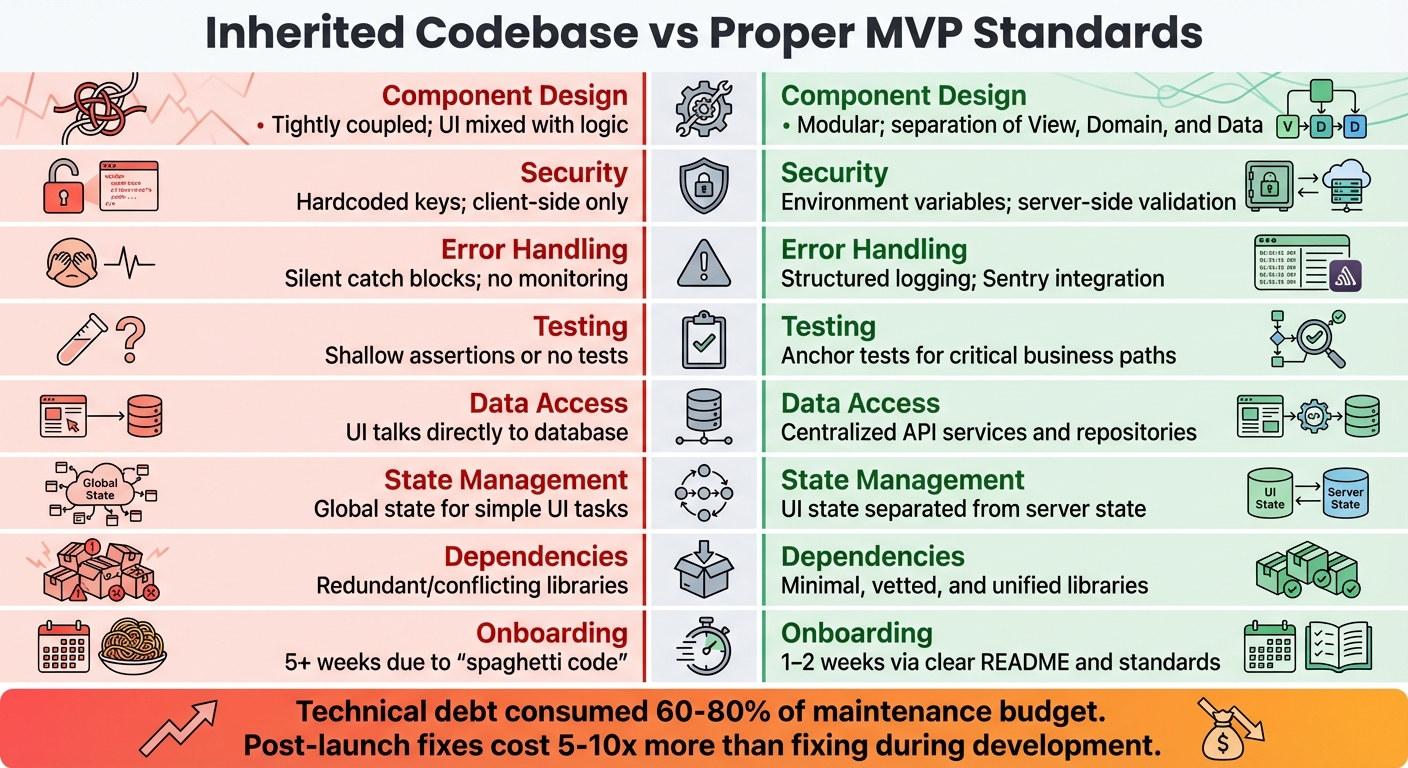
Broken Codebase vs Proper MVP Standards Comparison
We conducted AlterSquare‘s AI-Agent Assessment, which involved a comprehensive scan of the inherited codebase. This process aimed to identify issues like architectural weaknesses, security vulnerabilities, and performance problems. The results were concerning: the system was riddled with messy code and lacked a cohesive architectural design. While individual features worked independently, they created chaos when combined.
System Health Report: The Numbers
The audit uncovered hardcoded API keys for services like AWS, Stripe, and OpenAI embedded directly in the source code – an alarming security risk present in 4 out of 5 projects we reviewed [4]. Additionally, the database had no Row Level Security, making it possible for users to access others’ data by simply altering a URL parameter. This flaw had already caused a production issue where customers inadvertently viewed each other’s analytics dashboards [4].
There was no error monitoring system in place – no Sentry, no structured logging, and no way to track production failures. The founder only became aware of issues when users reported them, sometimes days after they occurred. Unfortunately, this operational blind spot was a recurring theme across every project we audited [4].
The overall architecture was overly complex and tightly coupled. UI components included API calls directly within useEffect, blending rendering, business logic, and data fetching into a single layer. Some component files exceeded 300 lines, making testing and code reuse practically impossible. Any change risked breaking something else [2][3].
"AI doesn’t remember your architecture. Every prompt is a fresh start… you get three features that each make perfect sense in isolation and absolute chaos when combined." – Paul the Dev [2]
The codebase also revealed 47 different date formatting methods and duplicative authentication logic spread across seven files [2]. API error handling followed three inconsistent patterns, and there were two competing approaches to state management. These inconsistencies pointed to a lack of oversight during development [4].
Finally, we benchmarked these findings against minimum viable product (MVP) standards to measure the extent of technical debt.
How It Compared to MVP Standards
The results of the audit, outlined above, were evaluated against established MVP benchmarks:
| Feature | Inherited Codebase | Proper MVP Standards |
|---|---|---|
| Component Design | Tightly coupled; UI mixed with logic | Modular; separation of View, Domain, and Data |
| Security | Hardcoded keys; client-side only | Environment variables; server-side validation |
| Error Handling | Silent catch blocks; no monitoring |
Structured logging; Sentry integration |
| Testing | Shallow assertions or no tests | Anchor tests for critical business paths |
| Data Access | UI talks directly to database | Centralized API services and repositories |
| State Management | Global state for simple UI tasks | UI state separated from server state |
| Dependencies | Redundant/conflicting libraries | Minimal, vetted, and unified libraries |
| Onboarding | 5+ weeks due to "spaghetti code" | 1–2 weeks via clear README and standards |
These architectural flaws had real-world consequences: Users could sign up, but there was no rate limiting. Payments were processed, but input validation was missing. Data was accessible, but there was no caching or query optimization [4].
The technical debt was consuming 60% to 80% of the maintenance budget [2]. Addressing these issues post-launch would cost 5 to 10 times more than fixing them during development [2]. With $300,000 already spent, the pressing question was whether to stabilize the existing system or start over from scratch.
The Biggest Problems in the Code
Our audit revealed deep-seated issues spanning backend logic, frontend inefficiencies, and database disarray. These problems stemmed from a lack of cohesive architecture and poor development practices.
Backend Problems
The backend was a chaotic mix of conflicting patterns. For example, authentication logic was duplicated across seven separate files, requiring manual updates for every security patch. The codebase also juggled multiple module formats – CommonJS, ES Modules, TypeScript, and JSX – all within the same project, which made development unnecessarily complex and error-prone.
Async functions were riddled with synchronous calls like .Result and .Wait(), leading to thread-pool starvation and frequent deadlocks. The system struggled to handle even 100 concurrent requests without freezing. Error handling was another weak spot: empty catch blocks masked critical failures, while verbose error messages exposed sensitive database structures to potential attackers.
Documentation was another glaring gap. Without centralized resources, new developers had to spend days deciphering configurations, stretching onboarding time from two weeks to five [2].
While backend issues disrupted logic and performance, the frontend had its own set of challenges.
Frontend Bloat
The React codebase was weighed down by oversized components – some exceeding 300 lines – where rendering logic, business rules, and API calls were all tangled together. This made testing and maintenance a nightmare. To make matters worse, the application used a mix of state management tools, including Redux, MobX, and the Context API, creating unnecessary complexity [6].
The library ecosystem was equally messy. Redundant tools like date-fns and dayjs coexisted due to uncoordinated decisions [2]. This pattern of redundancy extended across the stack, with inconsistent error-handling approaches adding to the chaos. Every new feature piled on more inefficiency instead of leveraging existing utilities.
Poor frontend architecture didn’t just slow things down – it made refactoring far more expensive. Costs were 1.8 to 2 times higher than in well-maintained systems [3], with developers spending a staggering 42% of their time addressing technical debt instead of creating new features [3]. A case study of CloudNine SaaS highlighted this issue: despite hiring 15 additional engineers, their feature rollout speed dropped by 60% due to the brittle codebase [6].
Beyond frontend and backend woes, the database was another major pain point.
Database Schema Problems
The database was littered with abandoned experiments. It contained 340 unused columns across 89 tables, none of which were documented [6]. With no clear guidelines on what could be safely deleted, the clutter only grew. To add to the complexity, the schema relied on hardcoded assumptions about local filesystems, which caused immediate failures during cloud migration.
Query inefficiencies were rampant. N+1 queries plagued every page load, leading to system crashes at just 300–400 concurrent users [7] – a far cry from the capacity expected for a production-level SaaS platform. These issues highlighted an urgent need for structural overhaul.
The result of a $300,000 investment? An unscalable, unmaintainable, and insecure system. The question wasn’t just how to fix it – it was whether fixing it was even feasible.
How We Fixed It: The Stabilization Plan
Turning around a $300,000 disaster wasn’t just about fixing bugs – it required a structured approach. AlterSquare implemented a Traffic Light Roadmap, a prioritization framework focusing first on survival, then stability, and finally scalability [2]. This framework ensured that immediate, critical fixes took precedence over less urgent enhancements.
Critical Fixes: Tackling the Urgent Issues
The first 48 hours were all about stabilizing the system. AlterSquare secured credentials, domain registrations, and infrastructure access, halting any new deployments [8]. This step created a safe environment to assess the damage and determine what could be salvaged.
Next, the team zeroed in on the Top 5 Critical Paths – essential workflows such as login, payments, data submission, user dashboards, and admin controls. These were thoroughly mapped and tested, while non-essential features were deprioritized [5]. To bolster security, pre-commit hooks were added to detect hardcoded secrets, and sensitive logic was moved server-side [2]. Additionally, memory leaks were patched, and Sentry was integrated to monitor and log errors that had previously gone unnoticed [5].
Performance was another major hurdle. The system struggled to support even 100 concurrent users without freezing. To address this, N+1 query issues were resolved by enforcing eager loading and adding database indexes to high-traffic tables [2]. These fixes stabilized the platform enough to handle normal user loads without crashing.
With immediate concerns addressed, the team shifted to a more deliberate, methodical approach.
Managed Refactoring: Building a Stronger Foundation
Once the system was no longer in freefall, AlterSquare adopted managed refactoring, dedicating 20% of each sprint to reducing technical debt and improving the platform [3][8]. Instead of large-scale rewrites, the team focused on incremental fixes to maintain production stability.
The codebase was reorganized into three distinct layers – View (UI), Domain (business logic), and Data (API/storage) – to prevent changes in one layer from disrupting others [3]. This structure made the system more maintainable and predictable.
To ensure critical workflows remained intact, anchor tests were introduced. These end-to-end tests, built with Playwright, validated essential functions like login, checkout, and data submission [5]. While not exhaustive, these tests acted as guardrails during refactoring. As frontend developer Paul Courage Labhani put it: "The moment you cannot clearly explain the code you are shipping, it likely does not belong in a live production system" [2]. The team also enforced a 30-Second Rule – any code a developer couldn’t explain in 30 seconds was rewritten or removed [2].
This phased approach laid the groundwork for long-term improvements.
Preparing for Scale
With stability achieved, the focus shifted to scalability. The monolithic architecture was broken down into feature-based folders, such as /features/cart and /features/checkout, instead of technical categories like /hooks or /components [3]. This change made it easier to isolate and test features without impacting unrelated parts of the system.
Server-state management was revamped using React Query, which streamlined caching and background refetching, replacing a cumbersome mix of Redux, MobX, and Context API [3]. The team also began cleaning up the database, documenting 340 unused columns across 89 tables for eventual removal [6]. These adjustments prepared the system to handle higher traffic and future growth.
By Week 12, the codebase had transformed from a chaotic mess into a stable, scalable system. Deployment frequency doubled, and the time developers spent addressing technical debt dropped from 42% to under 20% [3]. For the founder, this meant a product ready to grow – no longer a costly liability.
| Recovery Phase | Timeline | Key Activities |
|---|---|---|
| Triage & Stabilization | Weeks 1-2 | Secure credentials, freeze deployments, document architecture [8]. |
| Gap Analysis | Weeks 2-3 | Identify security and compliance gaps [8]. |
| Core Stabilization | Weeks 3-6 | Fix integration contracts and performance issues [8]. |
| Testing & Validation | Weeks 8-10 | Build test coverage to validate key features [8]. |
| Staged Deployment | Weeks 10-11 | Limited release with aggressive monitoring [8]. |
What Happened Next: Results and Lessons
The Numbers: What Actually Improved
By Week 12, the platform was fully production-ready. Deployment frequency doubled, and the time spent addressing technical debt dropped significantly. The system could now manage normal user loads without issues – something that should have been in place from the beginning.
The broader impact was striking. Companies that tackle technical debt through structured refactoring often see development speeds improve by 27–43%, while post-release defects decrease by 32–50% [3]. For this founder, the turnaround transformed a $300,000 liability into a product ready for growth.
These results highlight the importance of identifying the initial mistakes and implementing strategic changes moving forward.
Red Flags Founders Should Watch For
The audit revealed critical lessons and early warning signs that founders must not overlook. Some of the most glaring red flags included:
- Communication issues: Delays of more than 48 hours and vague processes.
- Problematic contracts: Agreements using "will assign" instead of "hereby assigns" for intellectual property rights [1].
- Lack of direct developer access: The founder only interacted with account managers, never meeting the actual developers.
Technical issues in the code were equally alarming. These included:
- Hardcoded API keys: Sensitive keys for services like AWS, Stripe, and OpenAI were directly embedded in the code.
- Inconsistent naming conventions: Variables named haphazardly, such as "data1" and "temp."
- Oversized components: Some components exceeded 300 lines, combining rendering, business logic, and API calls.
- Weak security practices: Security relied on superficial measures, like hiding buttons in the UI, instead of securing server endpoints. Worryingly, 80% of similar applications exhibit critical security vulnerabilities [2].
What Founders Should Do Differently
Addressing technical and security problems after a product launch can cost 5–10 times more than fixing them early on [2]. A proactive assessment could have prevented the $300,000 loss in this case.
To avoid similar pitfalls, founders should:
- Insist on direct developer access: Work directly with the developers from the start.
- Control the code repository: Use a personal or company-owned GitHub account instead of relying on an agency-managed version.
- Tie payments to milestones: Structure payments around the delivery of functional software in production, such as working authentication systems [1].
- Hire an independent technical advisor: Regular code reviews, costing $1,000–$2,000 per month, can save significant money and prevent project failure [1].
If these red flags had been caught during the initial audit, the $300,000 loss could have been avoided. Tools like AlterSquare’s AI-Agent Assessment are specifically designed to catch these issues early. This tool scans codebases to identify architectural flaws, security gaps, and tech debt hotspots before they spiral into bigger problems [2]. Findings are then categorized into a Traffic Light Roadmap, labeling issues as Critical, Managed, or Scale-Ready. At a starting price of $2,500, this kind of assessment could have saved the entire $300,000 investment.
FAQs
How can I tell if my dev team is creating hidden technical debt?
Hidden technical debt often reveals itself in ways that can disrupt workflow and efficiency. For instance, you might notice longer onboarding times, where new team members struggle to get up to speed. Or perhaps the same bugs keep reappearing, even after they’ve supposedly been fixed. Another red flag? Code that’s outdated, inconsistently written, or poorly documented, making it harder for developers to maintain or expand.
Specific signs to watch for include new hires taking too long to contribute, persistent errors in the same areas despite repeated fixes, and inconsistent practices like naming conventions or error handling. These issues don’t just slow teams down – they can compound over time if left unchecked.
To tackle this, focus on regular code reviews, keeping documentation up to date, and analyzing bug patterns. These steps can help identify and address hidden technical debt before it becomes a bigger problem.
Should I stabilize the existing codebase or rebuild from scratch?
If the system is riddled with major architectural issues, overwhelming technical debt, and lacks stability, starting from scratch is often the smarter move. On the other hand, if the core functionality is still solid, a phased approach to improvement might be more efficient. This could involve setting up isolated testing environments, modernizing components step by step, and carefully managing risks. The key is to evaluate whether the system can be repaired or if it’s beyond saving before making your decision.
What’s the fastest way to secure a broken app with hardcoded keys?
The fastest way to address the issue is to find and replace hardcoded keys right away. Begin by auditing your codebase, either manually or with automated tools, to pinpoint sensitive information like API keys or private keys. Swap these out for secure storage methods, such as environment variables or secret management tools like vaults. Next, rotate any compromised keys and update your configurations accordingly. To avoid similar problems down the line, implement consistent secret management practices as part of your workflow.








Leave a Reply