
How We Modernize Frontends Without Rewriting Them (And Why Rewrites Fail 60% of the Time)
Huzefa Motiwala March 9, 2026
Rewriting your frontend from scratch is risky – 60% of these projects fail. Instead of halting progress and doubling workloads, incremental modernization offers a safer, faster way to improve your system. By updating your frontend step by step, you avoid downtime, maintain feature delivery, and reduce risks tied to legacy systems.
Key Takeaways:
- Why full rewrites fail: They take 3x longer than expected, stall feature development, and often miss evolving business needs.
- Incremental modernization works: Update components, isolate new features, and integrate systems gradually.
- Proven results: Teams report 20–30% productivity gains and up to 30% lower costs with this approach.
Want to modernize your frontend without the risks? Start small, focus on high-impact areas, and deliver improvements in weeks – not years.
The Modern Frontend is a NIGHTMARE… even for a Lead Architect
sbb-itb-51b9a02
Why Frontend Rewrites Fail 60% of the Time
Rewriting software might sound like a fresh start, but the numbers tell a different story. On average, rewrites take three times longer than expected. And when you look at transformation projects as a whole, 70% fail – 31.1% get canceled before they’re done, and 52.7% go over budget or lose key functionality along the way [5]. These stats make one thing clear: full rewrites are a gamble, and the odds aren’t in your favor.
Joel Spolsky, co-founder of Stack Overflow, didn’t mince words when he called full rewrites "the single worst strategic mistake that any software company can make" [5]. Netscape’s infamous rewrite of Navigator 4.0 is a perfect example. The three-year project gave competitors all the time they needed to swoop in and steal market share [5].
So, what makes frontend rewrites so risky? Let’s dig into the key challenges.
Big-Bang Rewrites vs. Shifting Goals
One of the biggest hurdles is the mismatch between timelines and reality. A rewrite that’s expected to take two years is immediately at odds with two years of evolving business needs. By the time the new system is ready, it might already be outdated. And then there’s the demand for "feature parity" – the new system has to do everything the old one did, right out of the gate. This all-or-nothing approach delays delivering any value and raises the stakes even higher [2].
On top of that, there’s the Second-System Effect. Architects often over-engineer the new system, piling on every "ideal" feature or best practice they’ve ever dreamed of. The result? A bloated scope, spiraling complexity, and endless delays [5]. For projects costing over $10 million, cost overruns can hit an average of 189% – a staggering figure [5].
And while you’re chasing a moving target, there’s another major challenge lurking: dual maintenance.
Dual Maintenance: Twice the Work, Half the Progress
Rewrites don’t happen in a vacuum. Teams still have to keep the legacy system running – fixing bugs, patching security issues, and rolling out critical features. This means you’re essentially doing two jobs at once. And every new feature added to the legacy system just increases the gap between it and the rewrite.
This workload takes a toll. Without clear milestones to track progress, team morale can plummet, and executives may lose patience. Burnout becomes a real risk, and the rewrite can drag on at a snail’s pace [5].
Fragility and the Hidden Costs of Legacy Code
Legacy code isn’t just old software – it’s a record of years of real-world decisions. Every bug fix, edge case, and production patch tells a story. When teams strip away this "messy" code without fully understanding it, they risk undoing years of work. Problems that were solved long ago can rear their heads again [5].
And then there are the hidden dependencies. Modernizing a system often uncovers connections no one knew existed, throwing a wrench into migration efforts [2]. With original developers long gone and documentation often lacking, teams can spend months reverse-engineering the old code just to figure out how it works. This fragility is why 15–20% of large-scale software projects end up abandoned altogether [5].
Given these challenges, it’s clear why taking an incremental approach – updating systems piece by piece – can be a much safer bet than diving into a full rewrite.
Assessing Your Frontend: Tangled Mess vs. Modular Monolith
The journey to modernizing your frontend starts with understanding its current state. Some systems just need minor adjustments, while others are fragile and prone to breaking with even small changes. Knowing which category your system falls into determines whether you can modernize step-by-step or if you’re stuck constantly putting out fires.
Using AI-Agent Assessment for System Health
At AlterSquare, every modernization project begins with an AI-Agent Assessment. This automated scan dives deep into your entire codebase, uncovering architectural coupling, hidden dependencies, security risks, and areas of tech debt. The result is a System Health Report organized using a Traffic Light Roadmap:
- Critical: Requires immediate attention.
- Managed: Stable but needs ongoing monitoring.
- Scale-Ready: Optimized and ready for growth.
After the scan, our Principal Council – Taher, Huzefa, Aliasgar, and Rohan – adds a layer of business context to the findings. This ensures you focus on fixes that deliver the most impact, eliminating guesswork.
For organizations leveraging AI in software modernization, productivity increases of 20–45% are common [1]. A healthy system maintains a Technical Debt Ratio under 5% [1]. If your system exceeds that, it’s likely a Tangled Mess. This assessment helps you identify whether your system is a Tangled Mess or a Modular Monolith, shaping your modernization plan from the start.
What a Tangled Mess Looks Like
A Tangled Mess is where innovation takes a backseat because everyone is afraid to make changes. Developers in these systems spend just 30–40% of their time on new features, while bug fixes and maintenance eat up to 35% of their workload [4][2]. Small tasks that should take days can drag on for weeks because every change risks breaking something else.
Key warning signs include:
- High coupling: Changes in one part of the system cause unexpected regressions elsewhere.
- State chaos: Over-reliance on global state or deep prop drilling results in unpredictable behavior and costly re-renders [1].
- Frequent merge conflicts: Too many developers working on the same shared codebase leads to constant clashes.
"Technical debt isn’t just bad code. It’s the accumulation of quick fixes, skipped documentation, and short-term decisions made to save time, all of which slow you down later." – AlterSquare [4]
Organizations stuck in this state often spend 60–80% of their IT budgets just maintaining existing systems [1][4].
What a Modular Monolith Looks Like
A Modular Monolith, on the other hand, is organized around business features like "product-catalog" or "checkout" instead of technical layers. Each feature operates within well-defined boundaries, often exposing a public API (such as an index.ts file) to prevent unintended dependencies. UI components follow principles like Single Responsibility and Atomic Design, making them easier to test and reuse.
In these systems, business logic is separated from rendering logic through custom hooks. This allows you to tweak functionality without touching the interface. Tools like Nx or Turborepo help enforce boundaries, catching violations before they cause problems in production. Teams can update individual features without redeploying the entire application, reducing risk and speeding up delivery.
For example, in February 2024, VMware Tanzu collaborated with a global shipping company in Southeast Asia to map their system using an Event Storming workshop. Over five days, six developers and two business owners identified 12 high-priority business processes and 10 possible microservices. This approach avoided redundant legacy code and paved the way for smarter modernization [2].
If your system has clear folder structures, isolated components, and a Technical Debt Ratio under 5%, you’re likely working with a Modular Monolith. This structure enables safe, step-by-step upgrades – perfect for modernizing your frontend without resorting to expensive rewrites.
3 Incremental Modernization Strategies
Once you’ve identified whether your system resembles a Tangled Mess or a Modular Monolith, the next step is choosing the right approach to modernize it. Below are three strategies designed to deliver results in weeks rather than years, all while keeping your system stable and ensuring your users remain unaffected.
Component Refactoring
This strategy focuses on updating individual UI elements – like data tables, modals, or navigation bars – without overhauling the entire structure. Think of it as an inside-out migration: legacy components are replaced with modern alternatives like React or Vue, while the rest of the system stays intact [1].
At AlterSquare, their Variable-Velocity Engine (V2E) allows teams to integrate modernization efforts into ongoing sprint cycles. This approach prioritizes high-impact, low-risk components first, so you can validate changes before tackling more complex areas. For instance, starting with something simple like a footer or notification module can prove the concept before moving on to business-critical logic [1].
Visual Reverse Engineering can further streamline this process by analyzing real user interactions and generating modern code, state logic, and design tokens. This ensures that while technical debt is eliminated, the original "Business Logic Intent" is preserved. A great example: In 2026, a major bank used this method to extract 120 UI components from a 12-year-old mortgage portal into a React library in just three weeks. They deployed new modules within two months, completing the entire project in six months – shaving 75% off their initial 24-month estimate [7].
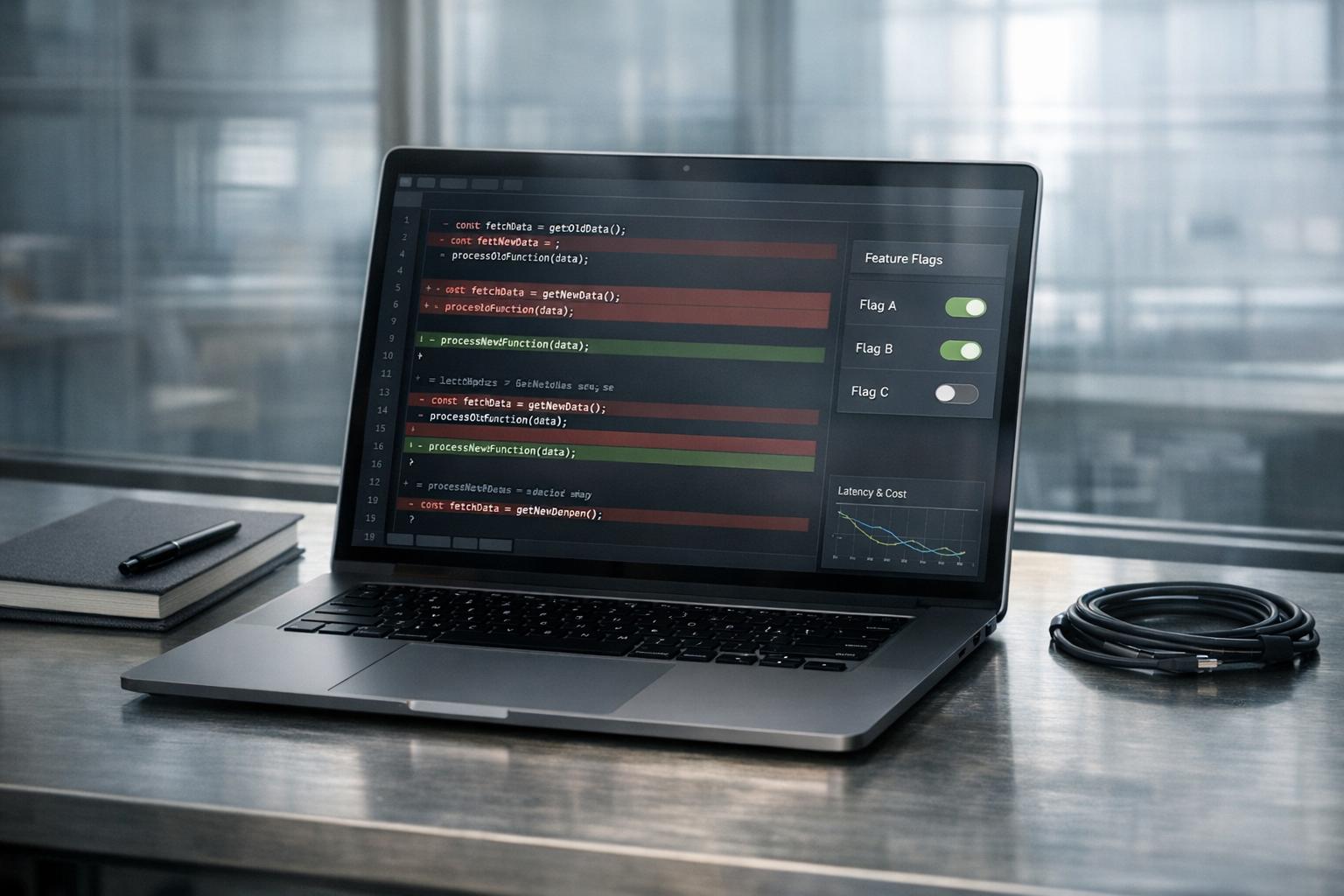
To prevent style conflicts during this transition, tools like Web Components and Shadow DOM can isolate CSS and JavaScript, ensuring modern styles don’t interfere with legacy global CSS [9][1]. Start small with low-risk components and use feature flags to gradually shift traffic between old and new implementations. If anything goes wrong, a quick config change allows for an immediate rollback [8][1].
"The safest upgrades look uneventful on the outside and disciplined on the inside." – Alex Kukarenko, Director of Legacy Systems Modernization, Devox Software [1]
Once components are incrementally refreshed, the next logical step is isolating the entire UI for a more seamless modernization process.
UI Isolation Using the Strangler Fig Pattern
The Strangler Fig Pattern offers a way to route new features to a modern frontend while keeping legacy routes intact. A reverse proxy, like NGINX or Cloudflare Workers, determines where each request goes. For example, /dashboard might still use your old jQuery app, but /new-reports could be served by a React interface [7].
This method works hand-in-hand with component refactoring by separating new features from legacy code. It follows a three-step cycle: Transform (build the new component), Coexist (run both versions behind a routing layer), and Eliminate (retire the old code) [11]. One critical rule here is that all new features must be built in the modern system – adding them to the legacy monolith only prolongs its life instead of phasing it out [11].
Airbnb demonstrated the power of this approach in 2024 when they upgraded from React 16 to React 18. By using a "React Upgrade System" with module aliasing and environment targeting, they conducted A/B testing in production while maintaining a list of "permitted failures" for incremental fixes. This allowed them to achieve a 100% rollout with zero rollbacks – all while continuing active feature development [1].
To manage risks, canary releases are invaluable. Start by rolling out changes to a small percentage of users (5-10%) and monitor for errors before scaling up. If issues arise, rollback is quick and seamless [10]. This strategy avoids downtime, preserves SEO and user bookmarks, and delivers value from day one instead of waiting years for a complete rewrite [10][7].
"The most important reason to consider a strangler fig application over a cut-over rewrite is reduced risk." – Martin Fowler, Author and Software Architect [1]
With the frontend isolated, attention turns to ensuring backend consistency through integration layering.
Integration Layering for Smooth Transitions
Integration layering provides a way to connect legacy and modern systems seamlessly. By setting up an entry point – such as an API gateway, reverse proxy, or façade – you can route incoming requests to either the legacy system or the new implementation [13]. This enables techniques like shadow mode or dual-write, where the new system processes data alongside the legacy one for validation without disrupting users [12].
A Service Layer or shared event bus (using window.dispatchEvent) helps synchronize state between older environments like jQuery and newer frameworks like React. Additionally, an Anti-Corruption Layer (ACL) translates legacy data models into modern formats, shielding the new system from outdated constraints [12][13].
A compelling example: Between February 2024 and April 2025, an insurance SaaS provider migrated a 380,000-line VB6 pricing engine to .NET 8. They used a Go-based reverse proxy for write-path interception and implemented an automated reconciliation loop. Over 14 months, they processed 12.4 million events, identifying just 847 mismatches (0.007%). This saved the company $4.2 million in pricing errors and reduced latency by 97.4% – from 1,247ms to just 32ms [12].
To minimize risks, start with read-heavy endpoints or isolated business capabilities. Implement a kill-switch to reroute traffic back to the legacy system instantly if the new layer encounters issues. Automated reconciliation tools can also alert you to data mismatches, ensuring consistency throughout the migration [12][13].
"Incremental migrations minimize risk, improve the time to validating the business value of a change, and eliminate planned downtime." – Malte Ubl, CTO, Vercel [1]
Results from Incremental Modernization
These strategies have led to clear, measurable gains in production. Here are three examples of how AlterSquare has managed to stabilize fragile systems and refresh frontends without undertaking a full system rewrite.
Case Study: 10x Bundle Optimization
One SaaS platform struggled with sluggish page loads caused by bloated JavaScript bundles, largely due to a 290 KB legacy library like Moment.js. By swapping it out for a modern alternative like date-fns (89 KB), the team slashed the dependency size by about 70% [1]. They also implemented tree-shaking and code-splitting techniques, which reduced the overall bundle size by a staggering 10x. As a result, page load times dropped from several seconds to under 500 ms. This wasn’t a complete overhaul – it was a precise, targeted refactoring of specific components that maintained the platform’s functionality while delivering a massive performance boost.
Case Study: Memory Leak Fixes for 15,000+ Users
A platform supporting over 15,000 concurrent users faced system instability due to memory leaks in its canvas rendering library, Fabric.js [6]. The issue stemmed from initializing multiple canvas instances simultaneously, which overwhelmed memory resources and caused browser crashes. AlterSquare pinpointed the problem using AI-powered auditing tools and introduced a single-instance initialization pattern. This solution stabilized the platform without disrupting other code or requiring downtime. Within days, responsiveness improved significantly, and crash reports dropped to nearly zero.
Case Study: UI/UX Modernization Without Downtime
A construction tech platform needed a complete UI refresh but couldn’t afford to interrupt operations. AlterSquare used an incremental approach, isolating and integrating new UI components one module at a time. Legacy templates were paired with React components using wrapper layers to maintain compatibility. Feature flags allowed for testing updates with small user groups before rolling them out more broadly. Over six months, the entire interface was modernized without a single minute of downtime. The results? A 50% reduction in development time for new features and a 75% improvement in page load times, aligning with similar modernization successes seen at companies like IKEA [6].
"Development became faster and more consistent, especially with the new Storybook documentation." – Andreja Migles, Senior Software Engineer, Conductor [14]
These examples highlight how incremental modernization can deliver real-world improvements, paving the way for further success in system updates and performance enhancements.
Rewrite Risks vs. Incremental Modernization Wins
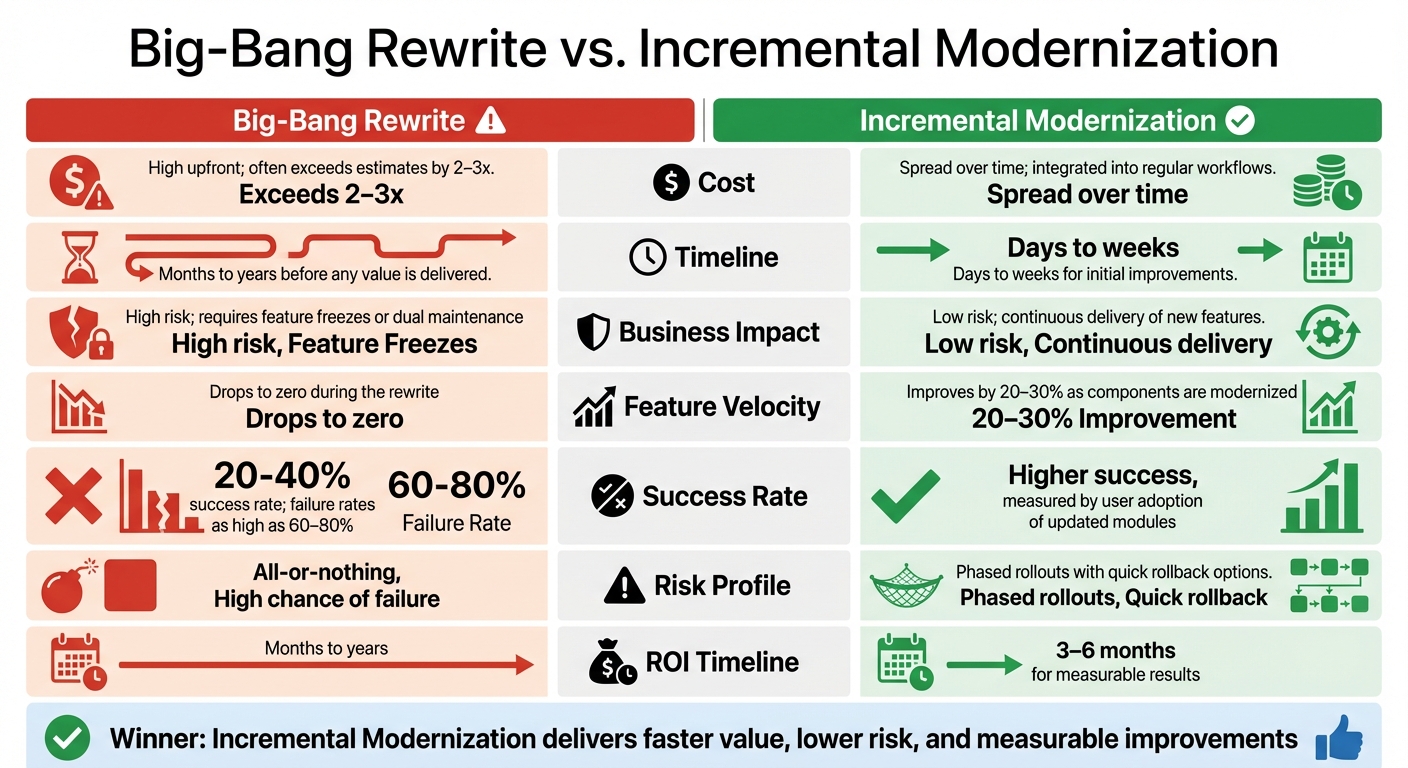
Big-Bang Rewrite vs Incremental Modernization: Cost, Timeline, and Success Rates
Choosing between a full system rewrite and incremental modernization isn’t just a technical decision – it’s a matter of staying competitive. The biggest danger with a full rewrite lies in what’s known as the "Second System Effect." Teams often try to address every legacy issue at once, which can overwhelm the project. Meanwhile, the business doesn’t stop. New features are still needed for the old system, meaning the rewrite has to play catch-up with constantly shifting requirements. This dual effort often results in double the workload with little to show for it.
Incremental modernization takes a different path. Instead of halting progress to rebuild everything from scratch, teams can upgrade the system piece by piece while continuing to deliver value. This approach ensures steady feature delivery and reduces risk. In fact, companies using modern frameworks report productivity gains of 20–30% and reductions in operating costs of up to 30% [1]. Teams leveraging microfrontend strategies see delivery speeds improve by 30–50% [2].
The table below highlights how incremental modernization consistently outperforms full rewrites across key metrics:
Comparison Table: Rewrites vs. Incremental Modernization
| Metric | Big-Bang Rewrite | Incremental Modernization |
|---|---|---|
| Cost | High upfront; often exceeds estimates by 2–3x | Spread over time; integrated into regular workflows |
| Timeline | Months to years before any value is delivered | Days to weeks for initial improvements |
| Business Impact | High risk; requires feature freezes or dual maintenance | Low risk; continuous delivery of new features |
| Feature Velocity | Drops to zero during the rewrite | Improves by 20–30% as components are modernized |
| Success Rate | 20–40% success rate; failure rates as high as 60–80% [15] | Higher success, measured by user adoption of updated modules |
| Risk Profile | All-or-nothing; high chance of failure | Phased rollouts with quick rollback options |
| ROI Timeline | Months to years | 3–6 months for measurable results [16] |
Incremental modernization not only preserves productivity but also helps control costs. While full rewrites gamble on long-term success, incremental updates deliver tangible progress in a matter of weeks.
Conclusion: Delivering Growth-Ready Frontends Without the Risks
Full rewrites often fall short of expectations. Teams often find themselves juggling dual maintenance as priorities shift. On the other hand, incremental modernization offers consistent progress, delivering results every few weeks instead of relying on a distant, uncertain launch.
Take Airbnb as an example. In July 2024, they successfully upgraded from React 16 to React 18 by using incremental A/B testing. This approach allowed them to achieve a 100% rollout without any rollbacks [1]. Their methodical, step-by-step process ensured continued business momentum while avoiding the pitfalls of a complete overhaul.
"The most reliable path from legacy to modern architecture is incremental migration rather than a complete rewrite."
– Mark Knichel, Vercel [1][2]
Your frontend doesn’t need to be flawless – it needs to be stable and modular. Whether you’re dealing with a Tangled Mess or a Modular Monolith, the journey begins with understanding your current system. Tools like an AI-Agent Assessment can quickly identify bottlenecks and help shape your modernization strategy. These assessments often reveal that 20% of files are responsible for 80% of software defects [3], giving you a clear starting point for action.
Begin with small, high-impact changes. Focus on a key component like a checkout flow, a dashboard widget, or a heavily used page. Modernize it, measure the results, and then move forward. This incremental approach ensures you can build a growth-ready frontend without gambling everything on a risky rewrite.
FAQs
How do I know if my frontend is a Tangled Mess or a Modular Monolith?
A "Tangled Mess" refers to a codebase where components are tightly interwoven, logic is duplicated, standards are all over the place, and technical debt runs high. This kind of setup makes the system fragile and a nightmare to maintain. On the other hand, a "Modular Monolith" organizes the code into independent modules with clearly defined interfaces. This structure reduces complexity and allows for easier incremental updates.
To determine where your codebase stands, assess it for component independence, consistency, and how easily updates can be implemented. This evaluation can help you pinpoint whether your system resembles a tangled mess or a modular monolith, providing clarity on the steps needed for modernization.
What should I modernize first to get quick wins without breaking production?
To modernize your frontend efficiently, begin with low-risk, manageable areas. Prioritize component refactoring by breaking down oversized components into smaller, modular pieces. Pair this with UI isolation, which helps stabilize and simplify updates. These strategies not only reduce complexity but also boost performance while enabling gradual improvements. The best part? You can achieve noticeable results quickly without the risks tied to a complete rewrite.
How can I roll out new UI safely and roll back fast if something goes wrong?
To introduce a new UI safely while keeping rollback options open, an incremental strategy like the UI Strangler Fig is highly effective. This method involves gradually replacing outdated components with new ones. A proxy layer is added to manage routing between the old and new systems, ensuring seamless functionality.
In addition, feature toggles play a crucial role in controlling the deployment process. These toggles allow you to enable or disable features without redeploying code, giving you flexibility during the rollout. By closely monitoring performance throughout the process, you can quickly identify any issues. If problems arise, you can instantly revert changes, reducing risks and maintaining stability during updates.






Leave a Reply