
What Engineering Teams Learn After Maintaining Large Frontends for Years
Huzefa Motiwala February 21, 2026
Maintaining large frontends over time can be a headache. The bigger the codebase, the more fragile it becomes, slowing down development and increasing technical debt. Here’s what experienced teams have learned to keep things running smoothly:
- Modular Architecture: Break apps into smaller, independent parts (e.g., micro-frontends or monorepos). This reduces complexity and allows for incremental updates.
- Standardized Code: Organize code by feature, not type, and use design systems for consistent UI and easier maintenance.
- Clear State Management: Separate state into UI, app, and server layers to avoid chaos and debugging nightmares.
- Performance Optimization: Use techniques like code splitting, lazy loading, and server-side rendering to improve load times and user experience.
- Automated Testing & CI/CD: Automate testing, deployments, and monitoring to catch issues early and maintain stability.
Key Stats:
- Technical debt can consume 40% of IT budgets and slow feature delivery by 25–50%.
- Companies like Kong cut deployment times from 90 minutes to 13 minutes by adopting modular strategies.
- Tools like Nx, Turborepo, and Module Federation simplify modularization, while testing frameworks like Playwright and Storybook prevent regressions.
The takeaway? Focus on modularity, automation, and efficient state management to keep your frontend scalable and maintainable.
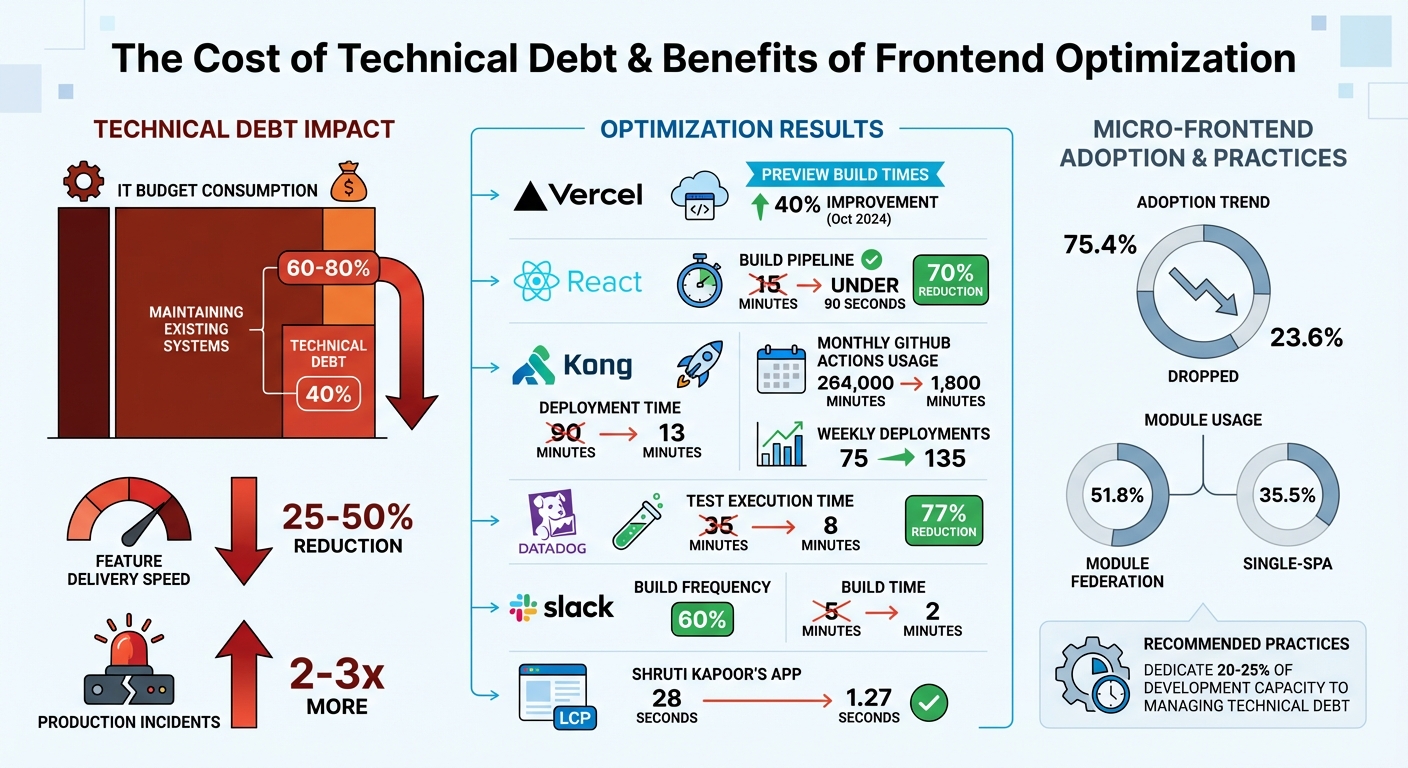
Technical Debt Impact and Frontend Optimization Statistics
Optimizing Large Codebases: Lessons from Web-Scale Front-Ends
sbb-itb-51b9a02
Lesson 1: Build Modular Frontend Architecture
When working with large codebases, unclear boundaries can be a major bottleneck. Developers often need to understand the entire system just to tweak a single feature, which slows everything down. Modularity solves this by breaking applications into smaller, independent modules. This approach reduces complexity, minimizes dependencies, and allows for isolated upgrades without impacting the rest of the system. By cutting down on interdependencies, modular design also helps manage technical debt more effectively [1][7].
The numbers back this up. In October 2024, Vercel split its monolithic Next.js application into three distinct micro-frontends: marketing, documentation, and the logged-in dashboard. This change led to over a 40% improvement in preview build times and local development compilation [12]. Another team transitioned their React monolith into six independent micro-frontends using Webpack Module Federation and Single-SPA. The result? Their build pipeline went from 15 minutes to under 90 seconds, and deployment times dropped by 70% [8]. These examples highlight the practical benefits of modular design.
"The ability to change the system safely is more valuable than any single implementation detail." – Feature-Sliced Design [1]
Another advantage of modular architecture is that it supports incremental upgrades. Instead of risky, large-scale migrations, teams can update frameworks or dependencies one module at a time. This approach allows legacy code to be replaced gradually, ensuring the application remains stable throughout [7]. Modular design also empowers teams to take full ownership of specific features, which can significantly boost delivery speed [7]. Over time, this approach ensures that frontends remain scalable and maintainable.
Micro Frontends vs. Monorepos: Which One to Use
When adopting modular strategies, teams often face a choice between micro frontends and monorepos. The right option depends on your team’s size and priorities. Micro frontends split applications into independently deployable units, enabling teams to release features without waiting on others. This method works best for large organizations with multiple teams working on different parts of a product. Monorepos, on the other hand, group multiple projects in a single repository, allowing for shared tooling and streamlined refactoring across the codebase [6][9].
Each approach has trade-offs. Micro frontends offer excellent scalability and team autonomy but come with challenges like managing version mismatches, CSS isolation, and integration complexity [10]. Monorepos simplify code sharing and provide unified tooling but require advanced build tools to handle growing codebases [6]. Interestingly, micro frontend adoption has dropped from 75.4% to 23.6% as teams realized they were often using them to solve organizational, rather than technical, challenges [10].
| Feature | Micro Frontends | Monorepos |
|---|---|---|
| Scalability | High (Independent scaling for apps/teams) | High (Shared infrastructure and tools) |
| Maintenance | Higher (More operational complexity) | Lower (Unified tooling and dependencies) |
| Team Velocity | High (Independent release cycles) | High (Streamlined refactoring and sharing) |
| Tech Stack | Flexible (Technology agnostic) | Unified (Typically shared stack) |
"Microfrontends are powerful but overused. They solve organizational scaling problems, not technical ones." – Vitalii Petrenko, Frontend Consultant [10]
For smaller teams with fewer than 10-15 developers, a well-designed monolith or simple monorepo is often the better choice [10]. As teams grow and require more independence, the complexities of micro frontends become worth the investment.
Tools That Support Modularity
The right tools make modular architecture easier to implement. Nx is a popular choice for both monorepos and micro frontends, offering features like dependency graph visualization and targeted builds to speed up development [6][11]. Turborepo is another tool focused on performance, using high-speed caching and parallel task execution. Vercel’s remote cache feature alone has saved customers over a decade of cumulative CI time by avoiding redundant work [2][6].
For micro frontends, Module Federation (Webpack 5) is a standout tool. It enables runtime integration, allowing applications to share dependencies dynamically without build-time coupling [8]. Among teams using micro frontends, Module Federation leads with 51.8% usage, followed by Single-SPA at 35.5% [10]. Single-SPA acts as a meta-framework, orchestrating multiple micro frontends on a single page and supporting various frameworks simultaneously [8][13].
To implement these tools effectively, organize code by business domain rather than file type. For example, group all components, hooks, and utilities related to a feature like "add-to-cart" in one place, rather than scattering them across generic folders [1][4]. Use index.ts files as public APIs for modules to control what other parts of the app can access, making internal refactoring safer [1]. Additionally, set up CI checks to catch circular dependencies and prevent "deep imports" that bypass module boundaries [1].
Lesson 2: Standardize Code and Design Systems
Disorganized code and mismatched UI patterns can slow teams down significantly. Developers often waste time searching through generic folders for relevant logic. A better approach? Organize code by feature. For instance, group everything related to a specific business capability – like authentication or billing – in one place. This makes it easier to locate, update, or remove features without causing unexpected issues elsewhere.
Feature-Sliced Design (FSD) takes this concept further by structuring code into layers – such as app, pages, widgets, features, entities, and shared. Each layer only imports from lower layers, which helps avoid circular dependencies. The Public API Pattern complements this by ensuring each module exposes a clean interface (commonly through an index.ts file) while keeping internal details hidden. Together, these strategies not only simplify code organization but also improve development speed and deployment efficiency.
"Structure drives behavior. The way you organize your frontend codebase influences how easily developers find things [and] how safely you can change or extend features."
– Feature-Sliced Design Documentation
These methods deliver real results. In 2023–2024, Kong UI Engineering revamped their Kong Konnect platform by transitioning from a monolithic structure to a standardized micro-frontend architecture using a pnpm monorepo. The impact? They slashed their total cycle time for linting, building, testing, and releasing from 90 minutes to just 13 minutes, reduced monthly GitHub Actions usage from 264,000 minutes to 1,800 minutes, and increased weekly app deployments from around 75 to 135 [14].
How to Organize Code in Large Frontends
Traditional type-based structures, which group code by technical roles (like components or hooks), can become unwieldy in large projects. A better alternative for scaling is to organize by business domain. For example, all components, hooks, tests, and styles for an "add-to-cart" feature can live in a single folder. This creates a self-contained unit that’s easier to understand and maintain.
Tools can also help enforce boundaries. ESLint’s no-restricted-imports rule, for instance, can prevent developers from bypassing a feature’s public API to access internal folders. Additionally, colocating related files – like .test.tsx, .styles.ts, and .stories.tsx – with their components boosts clarity and portability.
| Approach | Organizing Principle | Best For |
|---|---|---|
| Type-based | Grouping by technical roles (components, hooks) | Small apps and prototypes |
| Feature-based | Grouping by business domain (e.g., auth, cart) | Large-scale, multi-team applications |
| Feature-Sliced Design | Organizing into layers and business slices | Complex enterprise frontends |
Well-structured folders reduce cognitive load, making it easier for new developers to onboard and allowing existing teams to work more efficiently.
Creating and Maintaining Design Systems
A unified design system takes organization a step further by streamlining maintenance and ensuring visual consistency across applications. With an orderly codebase, building a shared design system becomes more manageable and impactful. Design tokens – essentially CSS variables for colors, spacing, and typography – help standardize UI elements across teams. Using a centralized tool like Style Dictionary allows these tokens to be exported seamlessly across platforms.
Breaking down design systems into distinct libraries for tokens, UI components, icons, and utility styles simplifies maintenance and reduces bundle size. Strict isolation is key – design system components should remain independent of the rest of the application. Tools like no-restricted-imports can enforce this separation.
In July 2024, Kong Inc. overhauled their UI library, Kongponents, moving from version 8 to version 9. Led by Software Engineer Maksym Portianoi, the team broke down their monolithic library into separate entities for design tokens, icons, and Vue components. By implementing custom Stylelint plugins to enforce token usage, they achieved a 1:1 match between Figma designs and development, ensuring a consistent user experience across Kong Konnect – all without disrupting feature delivery [15].
"Automation is the most effective way to combat anti-patterns."
– Maksym Portianoi, Software Engineer, Kong
When building a component library from an existing codebase, start small. Heap, for example, began with a simple component and used it as a blueprint for more complex ones. They relied on tools like Chromatic for automated visual regression testing and emphasized cross-team code reviews to spread knowledge about the design system. Comprehensive documentation, often hosted in tools like Storybook, is vital. It should include sandbox stories for testing properties, usage guidelines, and links to Figma mocks, making the system accessible and easy to use.
Lesson 3: Manage State and Improve Performance
As frontend applications grow more complex, combining UI state (like modal visibility), domain state (such as shopping cart data), and server state (like cached API responses) into a single store can lead to chaos. It’s often referred to as the "Mentos and Coke" problem – a volatile mix of mutation and asynchronicity that results in unpredictable and hard-to-debug systems[20].
Here’s a staggering example: ten independent boolean flags can create 1,024 possible UI configurations[16]. Without clear boundaries, any module can access any part of a global store. This can lead to "action-at-a-distance" bugs, where a change in one part of the state unexpectedly impacts another.
"Complexity is difficult to handle as we’re mixing two concepts that are very hard for the human mind to reason about: mutation and asynchronicity. I call them Mentos and Coke."
– Redux Documentation[20]
To tackle these challenges, modern teams separate state into three distinct layers. Remote data fetching and synchronization are handled by server cache tools like TanStack Query. Business logic and shared entities are managed with app state libraries like Zustand or Redux. Meanwhile, UI-specific state stays within components, managed through hooks like useState. This layered approach avoids the "god store" anti-pattern and allows each layer to be fine-tuned individually.
State Management Approaches
Centralized state management tools like Redux and MobX help create a single source of truth, making debugging more straightforward in large systems. Redux, inspired by the Elm architecture, enforces predictable state transitions through actions and reducers. However, it can add complexity and risks creating "mega-slices" if not carefully managed[20][16].
For lighter use cases, libraries like Zustand and Pinia offer simple APIs with less overhead, making them great for modular features. However, without proper boundaries, they can unintentionally morph into global state. On the other hand, MobX and Valtio use reactive primitives to automatically track dependencies, reducing the need for manual memoization. Still, this implicit behavior can make audits more challenging[16].
| Approach | Best Fit | Trade-offs |
|---|---|---|
| Redux Toolkit | Large teams with complex business logic | Higher ceremony; strong debugging tools[16] |
| Zustand / Pinia | Lightweight, modular feature stores | Risk of turning into global state[16] |
| MobX / Valtio | Reactive UIs with complex derived state | Implicit dependencies complicate audits[16] |
| React Context | Stable dependencies (themes, auth) | Poor for high-frequency updates[16] |
Some guiding principles can make state management smoother. Keep local state within components unless it’s genuinely shared. Name update functions after business actions (e.g., applyCoupon) to improve clarity and traceability. Avoid storing derived values; instead, compute them using selectors to prevent state drift. Tools like createSelector can memoize these computations, ensuring recalculations only happen when inputs change[17].
Beyond managing state, optimizing performance is critical to delivering a responsive experience.
Techniques to Optimize Performance
Good state management is just the beginning – performance tuning is an ongoing process to ensure scalability. Start by focusing on reducing bundle size, CPU usage, and load times[18]. Techniques like code splitting and lazy loading are essential. For example, instead of just splitting code by route, consider interaction-based lazy loading for heavy components like charts or editors that users might not always interact with.
A great case study comes from February 2026, when developer Shruti Kapoor revamped a React video player app. By cutting the bundle size from 1.71 MB to 890 KB, using the React Compiler for automatic memoization, switching to server-side rendering (SSR), and leveraging a CDN with priority tagging[19], the app’s Largest Contentful Paint (LCP) dropped dramatically – from 28 seconds to just 1.27 seconds.
"Performance isn’t a one-time task. As your app grows, new bottlenecks will show up, so keep optimizing the performance of your components as you build them."
– Shruti Kapoor, Senior Developer[19]
SSR is another powerful tool, shifting data fetching to the server to reduce render delays. This approach sends HTML that’s ready to display, improving LCP. The React 19 compiler further simplifies optimization by automating memoization, sparing developers the manual use of hooks like useMemo and useCallback.
For state-related performance, normalizing data structures – storing entities as IDs and dictionaries instead of deeply nested arrays – can save time during updates. When dealing with large lists, libraries like react-window help by rendering only the visible items, keeping the DOM light[18]. Additionally, attributes like fetchpriority="high" for critical images and loading="lazy" for secondary ones can streamline browser loading sequences.
Lesson 4: Automate Testing, CI/CD, and Monitoring
As frontends grow more complex, manual testing becomes less practical. It’s simply impossible to keep up with the sheer volume of changes without automation. Teams managing large frontends over the long haul quickly realize that automation is the only way to ship updates confidently while avoiding a flood of regressions.
Take Datadog, for example. Over the course of a year (2021-2022), they shifted from 565 manual acceptance tests to AI-driven synthetic browser tests. This massive effort – powered by over 525 contributors and around 6,300 commits per week – slashed their test execution time by 77%, cutting it from 35 minutes to just 8 minutes per commit. They tackled issues like test spamming by using deterministic region shuffling and setting 5-minute test timeouts [32].
Testing Methods for Large Frontends
Modern development teams often adopt the Testing Trophy approach, which places more emphasis on integration and component tests rather than isolated unit tests [21][22]. Component tests focus on ensuring the UI behaves as expected – whether it’s rendering properly or responding to user interactions like clicks or typing. Tools like Storybook and Testing Library make it easier to simulate user actions, such as finding buttons by their text or role, instead of relying on CSS classes or function names [22][23].
Visual regression testing adds another layer of protection by capturing screenshots and comparing them to baselines. This helps catch subtle, unintended changes that typical code-based tests might overlook [22][27].
Accessibility testing has also become a priority. By 2025, digital products across North America and Europe must meet accessibility standards by law [22]. Automated tools like Axe can flag common issues – such as missing ARIA attributes or poor color contrast – early in the development process [22][23].
End-to-end (E2E) tests, designed to verify entire workflows (like signing up or checking out), are another critical tool but should be used sparingly. These tests are resource-intensive, prone to flakiness, and slower to execute [22][23].
"Testing gives me full confidence for automated dependency updates. If tests pass, we merge them in."
– Simon Taggart, Principal Engineer, Twilio [23]
To avoid cascading failures, ensure each test runs independently – isolating local storage, cookies, and data [25]. Tools like Playwright can help by using auto-waiting and retriable assertions, which reduce unnecessary delays and flaky tests [24][25]. For debugging, configure your CI system to record traces (like screencasts or network logs) only on the first retry of a failed test. This minimizes performance overhead [25].
Once you’ve established solid testing practices, the next step is to integrate them into an efficient CI/CD pipeline.
CI/CD Pipelines and Monitoring Tools
Automated testing is just one piece of the puzzle. A well-designed CI/CD pipeline ensures quick feedback loops and reliable deployments. Smart pipelines don’t just run all tests – they prioritize them. For example, dependency graphs can identify which parts of the codebase are affected by a change, so only the relevant tests are run [28][29]. Remote caching further optimizes the process by sharing build outputs across runners, avoiding redundant work [2].
Slack’s Developer Experience team provides a great example. In April 2025, led by Software Engineer Dan Carton, they optimized their E2E testing pipeline for their monolithic repository. By using git diff to detect frontend changes and reusing prebuilt assets stored in AWS S3 when no changes were found, they reduced build frequency by 60% and cut build times from 5 minutes to just 2 minutes. This also helped reduce test flakiness [26].
Flaky tests are a constant headache for developers. Airtable tackled this in January 2023 when their Developer Effectiveness and Quality Engineering teams, led by Thomas Wang, implemented an automated flaky test management system. When a test failed on the main branch, the system ran it 100 times. If the failure rate exceeded 5%, the test was quarantined automatically. This reduced the time to isolate flaky tests from over a day to under an hour and brought build failure rates down to less than 2% [30].
Monitoring tools extend automation beyond deployment. Real User Monitoring (RUM) observes actual user interactions, highlighting device-specific issues and geographic performance differences [31][34]. Synthetic monitoring, on the other hand, uses automated scripts to simulate user behavior, helping teams identify problems before users encounter them [32][34]. Error tracking tools centralize JavaScript exceptions and crashes, providing helpful debugging details like browser versions, operating systems, and stack traces [31][33].
To ensure optimal performance, track Core Web Vitals such as Largest Contentful Paint (LCP), Interaction to Next Paint (INP), and Cumulative Layout Shift (CLS). These metrics are crucial for both user experience and SEO [31][34]. For Single Page Applications (SPAs), traditional page load metrics don’t apply. Instead, use the User Timing API and listen for popstate events to measure transition performance [33]. Additionally, OpenTelemetry can help trace issues across the frontend and backend by propagating trace headers, identifying whether a slowdown is due to a backend API timeout [33][34].
How AlterSquare Helps Startups Scale Frontends
AlterSquare offers customized solutions to help startups build scalable frontends, whether starting fresh or dealing with the complexities of technical debt. Creating a scalable frontend is no small feat, and rescuing one weighed down by technical debt is even harder. AlterSquare tackles both challenges by combining structured processes with engineering expertise, ensuring the systems they build can grow alongside the demands of expanding teams and increased traffic. Their approach focuses on delivering sustainable solutions that address both immediate needs and long-term scalability.
Building Scalable Frontends with AlterSquare’s I.D.E.A.L. Framework
The I.D.E.A.L. Framework – Discovery, Design Validation, Agile Development, Launch Preparation, and Post-launch Support – guides AlterSquare in helping startups make smart, early decisions that avoid technical debt. For startups starting from scratch, their 90-day MVP program leverages tools like Vue.js, Nuxt.js, and GoLang to create modular systems organized around business features rather than technical layers. This approach, rooted in Feature-Sliced Design (FSD) principles, prevents dependencies from becoming tangled as the system grows.
For startups with existing systems, AlterSquare offers Architecture Rescue & Legacy Modernization services. Instead of risky, all-at-once rewrites, they use incremental migration strategies like the Strangler Fig approach. This method focuses on modernizing high-value areas, such as checkout flows or user dashboards, while allowing ongoing feature development. By transitioning from monolithic systems to independently manageable slices, startups can maintain their development speed without sacrificing stability.
Tech Team Augmentation for Startups
AlterSquare also supports startups by integrating their engineers directly into existing teams. Through their engineering-as-a-service model, they become an extension of the business rather than just temporary contractors. Their engineers focus on implementing automated testing pipelines, enforcing code standards with tools like ESLint and Prettier, and setting up monitoring systems to track Core Web Vitals. These efforts ensure performance benchmarks like keeping LCP under 2.5 seconds, FID under 100 milliseconds, and CLS under 0.1.
For startups struggling with technical debt, AlterSquare dedicates 25% of development capacity to systematically reducing it. This approach prevents debt from spiraling out of control, as unchecked debt can lead to teams delivering 25–50% fewer features and being 2–3 times more likely to encounter production issues [3]. By addressing these bottlenecks, AlterSquare helps startups regain productivity and maintain the pace needed to stay competitive, all while keeping future maintenance costs in check.
Conclusion: What to Remember About Scaling Large Frontends
Scaling frontends is all about creating systems that are easy for teams to understand, update, and expand. Successful engineering teams focus on modularity using approaches like Feature-Sliced Design, enforce boundaries with public APIs, and standardize user interfaces with design systems rooted in Atomic Design principles. They also manage state effectively by breaking it into local, contextual, and global layers, improve performance through techniques like code splitting and lazy loading, and automate processes – everything from testing to deployment – using CI/CD pipelines and architectural fitness functions.
Consider this: 60% to 80% of IT budgets often go toward maintaining existing systems, leaving less room for innovation. Teams weighed down by technical debt deliver 25% to 50% fewer features and experience 2 to 3 times more production incidents [3]. But teams that adopt scalable principles early can see dramatic improvements. For example, Kong reduced their PR-to-production time from 90 minutes to just 13 minutes after implementing micro-frontends in January 2024 [3]. These practices don’t just boost speed – they also enhance system stability.
The key takeaway? Start early. Dedicate 20% to 25% of your development capacity to managing technical debt before it grows unmanageable [3][5]. Use strategies like the Strangler Fig pattern to modernize legacy systems incrementally, testing and validating each step along the way.
"The most reliable path from legacy to modern architecture is incremental migration rather than a complete rewrite." – Mark Knichel, Vercel [5]
For startups, these principles are more than just theory – they’re the foundation for sustainable growth. AlterSquare offers tailored solutions to help startups tackle these challenges. Whether it’s building a scalable frontend from scratch through their 90-day MVP program or modernizing legacy systems with their Architecture Rescue & Legacy Modernization service, AlterSquare ensures decisions made today won’t turn into tomorrow’s technical debt. Their engineers work alongside your team to implement robust testing pipelines, enforce code standards, and monitor Core Web Vitals, keeping your project on track.
A scalable, maintainable frontend doesn’t happen by accident. It requires disciplined modularity, clear upgrade processes, and expert guidance. Startups that prioritize these principles from the beginning avoid common bottlenecks, allowing their teams to focus on what really matters: delivering value and driving growth.
FAQs
How do I choose between micro frontends and a monorepo?
Choosing between micro frontends and a monorepo boils down to factors like team size, the level of autonomy required, and the complexity of your system.
- Monorepos work well for smaller teams or projects where integration is tight. They provide a unified codebase, making collaboration straightforward. However, as a project scales, managing everything in a single repository can become challenging.
- Micro frontends, on the other hand, shine when you have larger, distributed teams that need independence. They allow for independent deployments and give teams more control over their work. The trade-off? You’ll face added complexity, especially when managing boundaries, dependencies, and ensuring a consistent user experience.
Ultimately, the choice should align with how often you deploy and your long-term plans for maintainability.
What’s the best way to split state between UI, app, and server layers?
To manage state efficiently, it’s helpful to break it down based on its scope and lifecycle:
- Local UI state: Keep state like form inputs or toggle switches confined to their respective components. This keeps things isolated and easier to manage.
- Application-wide state: For data that needs to be shared across components, such as user authentication or theme settings, use centralized state management libraries. These tools help maintain consistency and scalability as your app grows.
- Server state: Handle data fetched from servers by caching and syncing it as needed. This keeps your UI up-to-date without unnecessary complexity.
By organizing state in this way, you reduce dependencies, streamline maintenance, and make scaling large frontends much more manageable.
Which performance fixes usually move Core Web Vitals the most?
To improve Core Web Vitals, focus on a few impactful strategies:
- Minimize JavaScript bundle size: Use techniques like code splitting to load only the necessary parts of your code and tree shaking to remove unused code. This reduces the weight of your JavaScript, leading to faster load times.
- Optimize rendering: Prevent layout shifts by ensuring elements are properly sized and positioned during the initial load. This improves visual stability and responsiveness.
- Apply modern compression: Methods like Brotli or Gzip compression can significantly decrease file sizes, helping your site load faster.
These steps not only improve site performance but also create a smoother, more enjoyable experience for users.








Leave a Reply